Commons New Uploads Screensaver
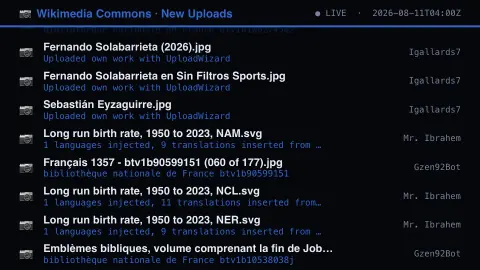
The Commons New Uploads screensaver streams real media files just uploaded to Wikimedia Commons. It is free, runs in your browser, and ESC exits.
Live preview
Press ESC to leave fullscreen. Settings are saved in your browser only.
How the Commons New Uploads screensaver works
The saver reads real recent upload log entries from Wikimedia Commons' own MediaWiki API.
Each entry shows a real file title and the real uploader's username.
The pipeline refreshes the feed regularly as new files are uploaded.
No key is required for this key-less public endpoint.
Inside the Commons upload log
Wikimedia Commons is a wiki-based repository of free-to-use media run by the Wikimedia Foundation, started in September 2004. Images, sounds, videos and other media are stored there once and can be used across Wikipedia and the other Wikimedia projects in all languages. Files must carry a free licence or be out of copyright, and fair-use uploads are not allowed. Uploads are logged by MediaWiki as they happen, and that public log is the raw material here.
Each line pairs a file name with the username of whoever uploaded it, plus a timestamp and sometimes the upload comment. Note that the uploader is the account that performed the upload, which is not necessarily the photographer or author: a person may upload their own work, but material can also be uploaded on someone else's behalf, so the username tells you who did the upload and nothing more.
A listing in this log does not mean a file will stay. Files that appear to break the rules can be nominated for deletion, discussed by the community and closed by an administrator, and clear violations may be tagged for speedy deletion. The log also records only that an upload occurred, not what the file looks like or how it is categorised.
A worked example
A real photo file uploaded by a real Commons contributor scrolls past exactly as logged, moments after upload.
Settings & tips
- File titles and uploaders are real, unfiltered Wikimedia Commons activity.
- Accent recolours the ticker text.
- Commons hosts real freely-licensed media used across Wikipedia.
Frequently asked questions
- Is this real upload data?
- Yes — real file uploads from Wikimedia Commons' own API.
- Is a key needed?
- No. Commons' recentchanges API is fully key-less.
- Are these the images actually shown?
- This feed shows real filenames and uploaders as text, not embedded thumbnails.
- Is it free?
- Yes — free, no download, in your browser.
- Is the uploader the person who took the photo?
- Often but not always. The log records the account that performed the upload, which is not necessarily the creator of the file.
- What licences are required on Commons?
- Files must have a free licence, such as certain Creative Commons licences, or be out of copyright. Fair-use uploads are not allowed.
- Can these files be deleted later?
- Yes. Files that appear to break the rules can be nominated for deletion or tagged for speedy deletion, so an entry that appears here may not remain on Commons.