Is It Down? Screensaver
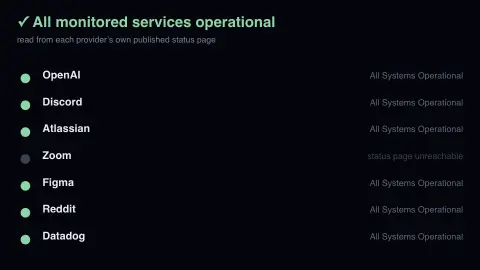
The Is It Down? screensaver reads the published operational status of seven services that a great deal of the internet depends on, directly from the status pages each company operates. When one of them is having a bad morning, this says so — usually before the incident reaches the news. It runs in the browser with nothing to install; press ESC to exit.
Live preview
Press ESC to leave fullscreen. Settings are saved in your browser only.
How the Is It Down? screensaver works
The saver reads Each provider's own Statuspage API, which exposes a machine-readable status.json.
No account and no key: the request goes straight from your browser, or from this site's own refreshed copy of the feed where the source does not allow browser access.
Values are drawn on a canvas that resizes with the window, so it works on a laptop or a wall display.
If the source is unreachable the saver says so on screen rather than showing stale numbers as though they were current.
Reading a status page
Statuspage, an Atlassian product, hosts the status pages of many software companies. Each page publishes machine-readable JSON, including a short overall status and a list of components, and teams can update it by hand or connect monitoring and alerting tools. The board reads those summaries for several major services.
The overall indicator uses a fixed set of values: none, minor, major and critical. Individual components report states such as operational, degraded_performance, partial_outage and major_outage. Which word applies is the provider's own judgement, so two companies may describe a comparable problem differently, and because people are involved, a notice can lag behind what customers first notice.
This matters for interpretation. A green mark means the company has not reported a problem, not that every feature works for every user, and regional or account-specific faults can be invisible at the summary level. Likewise, a red mark may apply only to one part of a large platform. For a problem in your own application, an independent test or the provider's incident history will tell you more than this board can.
A worked example
Seven rows, each with a coloured dot: green for operational, amber for a minor incident, orange or red for major and critical, blue for scheduled maintenance. The heading counts how many are in trouble, so a glance is enough. Each service is fetched independently, so one unreachable status page greys out a single row instead of emptying the board.
Settings & tips
- Accent and Background recolour the display without changing the data.
- Add it to a Multi-view grid to watch it alongside other live savers.
- Press ESC at any time to leave fullscreen.
Frequently asked questions
- Where does the status come from?
- From each company's own status page. Statuspage-hosted pages expose a machine-readable endpoint, so this is the operational state the provider is publishing to the world, not an outside guess.
- Will this catch an outage the company has not admitted yet?
- No. It reflects what the provider has published. Companies sometimes update their status page after users notice, so treat a green board as the official position rather than proof that everything works.
- Is this real data?
- Yes. It comes from Each provider's own Statuspage API, which exposes a machine-readable status.json. Nothing is invented or simulated, and if the source cannot be reached the saver reports that instead of drawing something plausible.
- Does it cost anything or need an account?
- No. Every screensaver here is free, runs in the browser and needs no sign-up. This one uses a public API that requires no key.
- Why might a service feel broken while its status shows operational?
- Status pages are updated by people or by monitoring rules the provider has connected, so there can be a delay. Issues limited to one region or feature may also not change the top-level indicator.
- What do the different severity levels mean?
- The overall indicator runs none, minor, major, critical, from no reported impact upward. The provider decides which level fits an incident, so the same word can mean different things at different companies.