What the Web Is About to Gain Screensaver
The What the Web Is About to Gain screensaver shows web platform features from Chrome Platform Status, gathered by the pipeline. The response carries an anti-JSON-hijacking prefix that must be stripped before it parses, and sends no CORS header. Milestones far in the future carry a stray entry each, so a milestone needs real substance before it is used. It's free, runs in your browser, and ESC exits.
Live preview
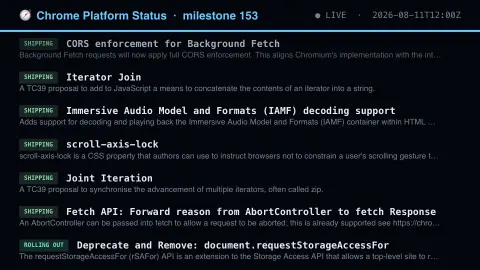
Press ESC to leave fullscreen. Settings are saved in your browser only.
How the What the Web Is About to Gain screensaver works
The saver reads the source described above and draws it on a canvas — no account, no tracking.
Web platform features from Chrome Platform Status, gathered by the pipeline. The response carries an anti-JSON-hijacking prefix that must be stripped before it parses, and sends no CORS header. Milestones far in the future carry a stray entry each, so a milestone needs real substance before it is used.
It refreshes on a schedule, so what you see stays current.
Colours and any options can be changed in settings; nothing is stored beyond your own browser.
What Chrome Platform Status tracks
Chrome Platform Status is the Chrome team's public registry of web platform features, APIs and behaviour changes. A feature gets an entry when it is proposed and keeps accumulating status information as it moves through stages such as prototyping, origin trial, shipping and sometimes deprecation or removal.
The data here is grouped by milestone, meaning the numbered Chrome release in which a feature is expected to ship or reach a given stage. Each record has a name and a short summary describing the feature, and the registry is the place the Chrome team uses to track where a feature stands. The Chrome release schedule, published by the Chromium project, sets the dates for each milestone.
Appearing on the list is not a guarantee. Plans change, features may slip a milestone, ship behind a flag, or be pulled after an origin trial. Also, a feature in Chrome is not necessarily supported in Firefox or Safari, so cross-browser availability needs a separate check, for example on a compatibility table.
A worked example
Web platform features from Chrome Platform Status, gathered by the pipeline. The response carries an anti-JSON-hijacking prefix that must be stripped before it parses, and sends no CORS header. Milestones far in the future carry a stray entry each, so a milestone needs real substance before it is used.
Settings & tips
- Accent and Background recolour the display.
- Every value on screen comes from the live source — nothing is simulated.
- Press ESC to leave fullscreen.
Frequently asked questions
- Is this real data?
- Yes — it comes from the source named on this page and is refreshed on a schedule.
- Is a key needed?
- No. This source is fully key-less.
- Is it free?
- Yes, and it runs entirely in your browser.
- What is a milestone?
- It is the version number of a Chrome release, such as the milestone in which a feature is expected to reach stable users.
- Does a feature listed here work in every browser?
- No. The entry reflects Chrome's plans, and other engines may implement a feature later, differently or not at all.
- What is an origin trial?
- It is a time-limited experiment where a site registers for a token to enable a new feature for its own users, without flags, so Chrome can gather feedback before deciding whether to release it to everyone.