How A Web Standard Grows Up Screensaver
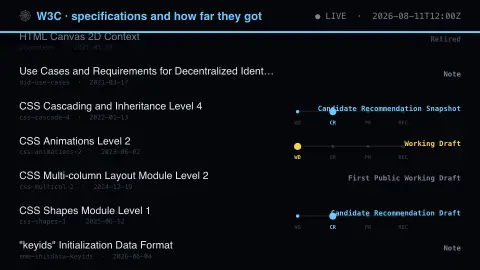
The How A Web Standard Grows Up screensaver shows w3C specifications and the maturity stage of their latest version, gathered key-less by the pipeline. It's free, runs in your browser, and ESC exits.
Live preview
Press ESC to leave fullscreen. Settings are saved in your browser only.
How the How A Web Standard Grows Up screensaver works
The saver reads the source described above and draws it on a canvas — no account, no tracking.
W3C specifications and the maturity stage of their latest version, gathered key-less by the pipeline. A spec climbs from Working Draft to Recommendation, plenty never finish, and the date matters as much as the rung it stopped on.
It refreshes on a schedule, so what you see stays current.
Colours and any options can be changed in settings; nothing is stored beyond your own browser.
The maturity ladder for W3C specifications
The World Wide Web Consortium was founded by Tim Berners-Lee in 1994 and develops web standards through a formal process. On the Recommendation track a specification begins as a Working Draft and may become a Candidate Recommendation once it meets the transition requirements, including wide review. A Proposed Recommendation then precedes the final W3C Recommendation, which requires adequate implementation experience.
A Candidate Recommendation comes in two forms. A Snapshot is the formally reviewed version, while a Candidate Recommendation Draft integrates later changes so reviewers can see the combined specification before the next snapshot. Notes are a separate track rather than a failed rung: they document material such as use cases or best practices that is not meant to be a formal standard.
This saver lists each specification's current status and the date of its latest version, using fields such as a short name like css-color-4 and a title. The number in the name is the module level. Be wary of treating a status as a deadline or promise: a Working Draft is a work in progress and can be revised or discontinued, so a document stuck at an early rung may simply have been overtaken.
A worked example
W3C specifications and the maturity stage of their latest version, gathered key-less by the pipeline. A spec climbs from Working Draft to Recommendation, plenty never finish, and the date matters as much as the rung it stopped on.
Settings & tips
- Accent and Background recolour the display.
- Every value on screen comes from the live source — nothing is simulated.
- Press ESC to leave fullscreen.
Frequently asked questions
- Is this real data?
- Yes — it comes from the source named on this page and is refreshed on a schedule.
- Is a key needed?
- No. This source is fully key-less.
- Is it free?
- Yes, and it runs entirely in your browser.
- Does Recommendation mean browsers support it?
- Not necessarily. A Recommendation means the process was completed, including showing adequate implementation experience, but actual browser support varies by feature and over time.
- Why do old drafts keep appearing?
- The list shows the latest version of each specification, so a document last touched years ago still appears with its old date. That age is part of the story.