Boing Ball Screensaver
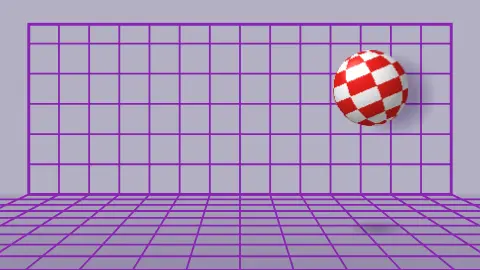
Boing Ball is a free, in-browser screensaver inspired by the Amiga demo: a red-and-white checkered ball bounces and spins in front of a purple grid and casts a soft shadow on the wall. It is drawn live, and ESC exits at any time.
Live preview
Press ESC to leave fullscreen. Settings are saved in your browser only.
How the Boing Ball screensaver works
The ball is a small sprite computed from the geometry of a sphere. For each pixel of the sprite the saver works out the point of the sphere it shows, then undoes the ball's fixed tilt to find that point in the ball's own frame, giving its longitude and its latitude band. This is done once per size change.
Because the ball spins about its own tilted axis, each pixel's latitude never changes and its longitude simply grows with the spin angle. Each frame therefore costs one addition and one lookup per pixel, and the checker colour is chosen from whether the longitude check and the latitude band add up to odd or even.
The checks are eight around the equator and eight from pole to pole. The shading, a soft light from the upper left and a small highlight, is baked into the colours once, and the sprite's edge is anti-aliased.
The bounce is a parabola with a fixed period, the sideways drift has constant speed, and the spin reverses when the ball turns at a side. The grid is a flat wall with square cells and a floor whose lines run toward a vanishing point at mid-wall; the wall shadow is offset to the right and down, and a smaller shadow on the floor shrinks as the ball rises.
The Boing Ball and the Amiga
Accounts credit Amiga engineers Robert J. Mical and Dale Luck with creating the Boing Ball, made to show off the Lorraine prototype, the Amiga's codename at the time, at the Consumer Electronics Show in January 1984. The Generation Amiga history article calls it the first demo shown on the prototype and describes a ball of about 140 by 100 pixels that bounced and spun with a boing sound. The original team reportedly preferred it as the Amiga's trademark, but Commodore chose a different logo, a rainbow double checkmark.
Much of the surrounding story, such as how the demo was finished and how visitors reacted, is anecdote, and the sources do not agree on every detail. Wikipedia's demoscene article separately describes the Amiga's announcement in 1985 as featuring a spinning checkered ball casting a translucent shadow, so dates in popular retellings vary. This page therefore says only that the demo was reportedly shown in January 1984.
This saver is not a port. It borrows the look: a checkered ball, a bounce, a purple grid and a wall shadow.
Sources: generationamiga.com article 'Amiga History: The story of the Boing Ball' (2020), sca.ch/amiga/guests/boing.html, and en.wikipedia.org/wiki/Demoscene, fetched or searched while writing this page.
A worked example
At 1920 by 1080 the ball is about 300 pixels across, so the sprite has roughly 90,000 pixels. At the default Speed 5 one bounce takes 1.45 seconds and the ball crosses the width in about 4 seconds, so it makes a little under three bounces per pass.
Settings & tips
- Ball colours offers five pairs, from the classic red and white to gold and charcoal.
- Speed scales the bounce, the drift and the spin together.
- Turn Show grid off to see just the ball and its shadow on a plain wall.
- Background sets the wall and floor colour; the grid lines stay purple.
- Press ESC to leave fullscreen.
Frequently asked questions
- What was the original Boing Ball?
- It was a demo built for the prototype of the computer that became the Amiga and shown at the January 1984 Winter CES, credited to Dale Luck and R. J. Mical. It later became an unofficial symbol of the Amiga.
- Is this the original demo?
- No. It is a new browser version inspired by it. The original reportedly leaned on the Amiga hardware's scrolling and colour tricks, while this one computes the ball in ordinary code.
- Is it using 3D graphics?
- No. It uses a normal 2D canvas and works out the sphere's surface itself, with no 3D library.
- Is it free?
- Yes. It runs free in your browser with no download, account or key.
- Why does the ball change spin direction?
- It turns around at each side of the screen, and the spin is set to follow its travel direction, as in the original.
- Can I change the colours?
- You can pick one of five ball colour pairs and set the background colour. The grid lines stay purple.
- Why does the shadow sit to the right?
- The shadow on the wall is offset to the right and slightly down, as if lit from the upper left. It is a simple soft circle, not a computed shadow.