What the Web Pulled Out Screensaver
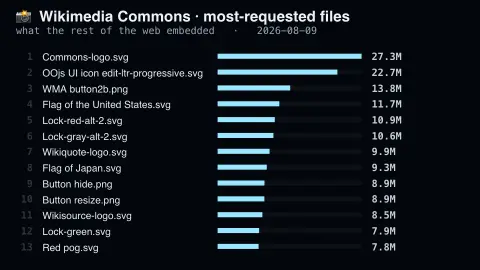
The What the Web Pulled Out screensaver shows the most-requested files on Wikimedia Commons, key-less. Not a popularity contest among photographs but a record of what the rest of the internet hotlinked — and the answer is overwhelmingly flags and infobox icons. It's free, runs in your browser, and ESC exits.
Live preview
Press ESC to leave fullscreen. Settings are saved in your browser only.
How the What the Web Pulled Out screensaver works
The saver reads the source described above and draws it on a canvas — no account, no tracking.
The most-requested files on Wikimedia Commons, key-less. Not a popularity contest among photographs but a record of what the rest of the internet hotlinked — and the answer is overwhelmingly flags and infobox icons.
It refreshes on a schedule, so what you see stays current.
Colours and any options can be changed in settings; nothing is stored beyond your own browser.
What most-requested means on Commons
Wikimedia Commons is the shared media library behind Wikipedia and its sister projects, a repository of public domain and freely licensed images, sound and video that any Wikimedia project can embed without a separate upload. It holds well over a hundred million files. Wikimedia's analytics service publishes media request counts, including a list of the most-requested files for a given month, and this screensaver draws on that kind of ranking.
The ranking does not measure which photograph people admire most. A file is counted each time a browser or app fetches it, so the winners are small graphics placed in templates on huge numbers of articles: national flags, map icons, warning symbols, the little pictograms in infoboxes. One flag used in a sports results table is fetched again whenever any page showing it is loaded, without anyone looking at it.
The counts can be filtered by referrer and agent type, and they include loads by other sites and apps that hotlink Commons files directly, so the numbers are best read as relative scale rather than audience size. Photographs and artworks usually appear much lower. Titles are the file names, which is why they often begin with the word File and end in an extension.
A worked example
The most-requested files on Wikimedia Commons, key-less. Not a popularity contest among photographs but a record of what the rest of the internet hotlinked — and the answer is overwhelmingly flags and infobox icons.
Settings & tips
- Accent and Background recolour the display.
- Every value on screen comes from the live source — nothing is simulated.
- Press ESC to leave fullscreen.
Frequently asked questions
- Is this real data?
- Yes — it comes from the source named on this page and is refreshed on a schedule.
- Is a key needed?
- No. This source is fully key-less.
- Is it free?
- Yes, and it runs entirely in your browser.
- Why are flags at the top?
- They are embedded in templates used by a vast number of articles, so they are fetched far more often than any individual photograph.
- Does a high count mean it is a popular image?
- No. It means it is requested often, which says more about where it is embedded than about how many people looked at it.
- Who counts as a requester?
- Any browser, app or website that fetches the file, including other sites that link to Commons directly. Wikimedia's data can be split by agent type and referrer.