Turbulence Screensaver
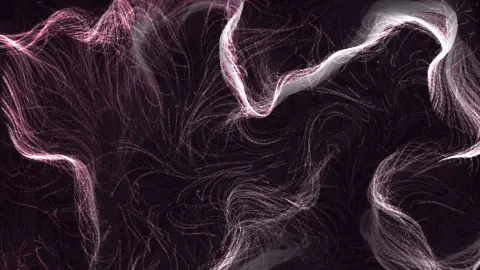
Turbulence is a free, in-browser screensaver driven by fractal Brownian motion (fBm): four layers of simplex noise, each at twice the frequency and half the weight of the last, summed into one field. Wide, slow currents carry progressively finer eddies on top of them, the way real turbulent flow has structure at every scale. Nothing to download, and ESC exits at any time.
Live preview
Press ESC to leave fullscreen. Settings are saved in your browser only.
How the Turbulence screensaver works
A single noise layer has one characteristic size. Fractal Brownian motion adds several layers, called octaves, each at double the previous frequency and half the previous amplitude. The sum has structure at every scale from the width of the screen down to a few pixels, which is the statistical signature of turbulence.
This saver uses four octaves. The first sets the broad sweep of the flow, the second bends it into large eddies, and the last two add the fine shivering detail that makes the streams look alive. The weights are normalised so the sum still reads as a clean angle.
Every octave advances along its time axis at its own rate — higher octaves faster, since they are sampled at higher frequency — so the fine detail flickers while the large-scale flow changes slowly, just as in a real fluid. Evolve scales all of them together.
Detail shifts the whole stack up or down in frequency. Low values make the first octave dominate and the field flows in one broad direction; high values push the fine octaves onto the screen and the streams break into shivering filaments.
Fractal Brownian motion and the look of turbulence
Fractional Brownian motion was introduced by Benoit Mandelbrot and John Van Ness in 1968, generalising ordinary Brownian motion, the random motion named after the nineteenth-century biologist Robert Brown. In graphics the same idea is used in a simpler form, a sum of noise layers at several scales, and Ken Musgrave’s procedural fractal terrain work is a well-known example of it being used for landscapes.
The recipe is controlled by two numbers: lacunarity, how much the frequency grows with each layer, and gain, how much the amplitude shrinks. The gain is tied to the Hurst exponent of the underlying process, where a higher exponent means a smoother result. Doubling the frequency and halving the amplitude, as here, gives a fairly smooth field with fine detail that fades quickly. Real turbulence is a different matter: in Kolmogorov’s 1941 theory the smallest scales are universal and viscosity dissipates their energy as heat. The picture looks turbulent because it has structure at every scale, not because it solves any fluid equations.
The base layer is simplex noise, devised by Ken Perlin in 2001 to address limitations of his classic noise function in higher dimensions. It uses simplices, which are triangles in two dimensions, rather than the corners of a hypercube, and it shows no noticeable directional artifacts. Because the result is a smooth angle field, features move because the noise coordinates are shifted over time, not because anything is pushed by forces.
A worked example
At the defaults — Sakura palette, 2200 particles, Trail 62, Detail 1.2 — pink and cream currents sweep across the screen while their edges shiver with small eddies. Set Detail to 0.5 and the small eddies vanish into one broad, slow tide; set it to 3 and the tide dissolves into fine, fast filaments that look like smoke torn by wind.
Settings & tips
- Detail is the whole story for this field: try 0.5, 1.2 and 3 before touching anything else.
- Blend in Curl noise at 40% to keep the fine octaves from pooling particles in the corners.
- Trail 80 with Speed 0.6 turns the turbulence into a slow, dense oil painting.
Frequently asked questions
- What does fBm stand for?
- Fractional (or fractal) Brownian motion. In graphics it means summing several octaves of noise at doubling frequency and halving amplitude, which produces self-similar detail at every scale — the standard recipe for clouds, terrain and turbulence.
- Is the Turbulence screensaver free?
- Yes. It runs free in your browser with nothing to download or install, and it works offline once the page has loaded.
- What does the Seed setting do?
- Everything is deterministic from the seed: the noise table, where the field’s features land and the order particles spawn in. Leave it blank for a fresh random layout on every run, or type any short word or number to get the same layout back each time.
- Why does the image ripple when I move the mouse?
- The cursor and a lagging echo of it act as two wave sources. Their interference pattern nudges nearby particles onto the bright fringes and dims the dark ones, so the flow visibly reacts to you. Turn off Cursor ripples in the settings if you want the field left alone.
- How do I exit the Turbulence screensaver?
- Press the ESC key at any time to leave fullscreen and return to the page.
- What is an octave in noise?
- An octave is one layer of noise in the stack. Each successive octave has a higher frequency and lower amplitude, adding finer detail on top of the larger shapes.
- How does simplex noise differ from Perlin noise?
- Perlin’s classic noise interpolates gradients at the corners of square cells (hypercubes in higher dimensions), while simplex noise uses simplices, triangles in 2D, which need fewer corners per cell and scale better to higher dimensions. It also shows no noticeable directional artifacts.
- Is this a real fluid simulation?
- No. It borrows the multi-scale look of turbulence through layered noise, whereas a true simulation would solve equations such as Navier-Stokes.