What People Play Screensaver
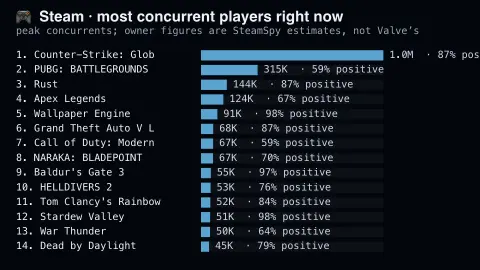
The What People Play screensaver ranks Steam games by concurrent players, with the positive review percentage alongside. It runs in the browser with nothing to install; press ESC to exit.
Live preview
Press ESC to leave fullscreen. Settings are saved in your browser only.
How the What People Play screensaver works
The saver reads SteamSpy, refreshed through this site's pipeline.
No account and no key: the request goes straight from your browser, or from this site's own refreshed copy of the feed where the source does not permit browser access.
Values are drawn on a canvas that resizes with the window, so it works on a laptop or a wall display.
If the source is unreachable the saver says so on screen rather than showing stale numbers as though they were current.
SteamSpy's estimates and what they mean
Steam is Valve’s PC game store, and SteamSpy is an independent site, created by Sergey Galyonkin and launched in 2015, that estimates how well titles are doing. It uses Steam’s Web API to read publicly visible profile data and extrapolates from a limited number of profiles to estimate ownership, so every figure is an estimate rather than a number from the store. Owner counts are given as ranges or with a margin of error, and the site warns against trusting numbers below 30,000.
Fields on screen carry specific meanings. CCU is concurrent users, how many people were playing at one time; SteamSpy’s API reports the peak for the previous day. Owners is an estimate of how many accounts own the game, and SteamSpy notes that this includes copies from free weekends, which can inflate counts, so ownership is not the same as paid sales. Review figures say how players rate a game, not how many play it.
Estimates became less reliable after Steam changed its default profile privacy settings in 2018, reducing the data available for sampling. Galyonkin responded by reviving older algorithms that use other public data, which his tests found accurate on most games but with more outliers than the original method. Treat the board as a rough picture of attention, useful for seeing which titles are active.
A worked example
Fourteen games ranked by peak concurrents, each with the share of reviews that are positive. Concurrents are the honest measure of a game's present life: sales describe a purchase made once, while concurrents describe people who opened it this hour — which is why decade-old shooters routinely outrank the year's biggest release.
Settings & tips
- Accent and Background recolour the display without changing the data.
- Add it to a Multi-view grid to watch it alongside other live savers.
- Press ESC at any time to leave fullscreen.
Frequently asked questions
- Are the owner numbers accurate?
- No, and they are labelled as estimates. SteamSpy infers ownership from sampling rather than measuring it, and Valve does not publish the real figures. The concurrent-player counts are far more reliable.
- Why only one SteamSpy feed?
- Because its top100forever and top100in2weeks endpoints return byte-identical payloads. Shipping both would have produced two screensavers with the same content under different names.
- Is this real data?
- Yes. It comes from SteamSpy, refreshed through this site's pipeline. Nothing is invented or simulated, and if the source cannot be reached the saver reports that instead of drawing something plausible.
- Does it cost anything or need an account?
- No. Every screensaver here is free, runs in the browser and needs no sign-up. This one uses a public API that requires no key.
- What does CCU stand for?
- It means concurrent users: the number of people playing a game at the same moment, which is a measure of live activity rather than total ownership.
- Does owners mean copies sold?
- No. It is an estimated number of accounts that own the game, and it includes copies from free weekends, so it is not the same as paid sales.
- Why are review figures included?
- They show how players feel about a game. A game can be popular and still be reviewed poorly, or the reverse.