GitHub Pulse Screensaver
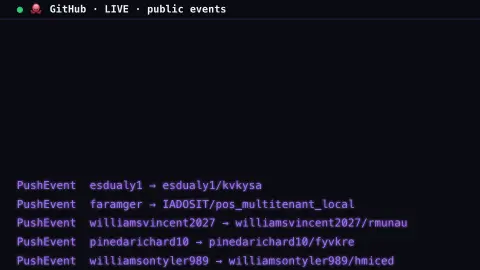
The GitHub Pulse screensaver is a live stream of public GitHub activity — pushes, new stars and forks across the open-source world — raining down in a code-terminal style from the key-less GitHub events API. It's free, runs in your browser, and ESC exits.
Live preview
Press ESC to leave fullscreen. Settings are saved in your browser only.
How the GitHub Pulse screensaver works
The saver polls GitHub's public events feed, the firehose of activity across open-source repositories, with no key.
Each event — a push, a star, a fork, a pull request — streams by as a terminal line, colored by type.
New events are fed in gradually between refreshes so the stream keeps flowing, and duplicates are filtered out.
Because the public feed is rate-limited, the saver refreshes gently and pauses politely if it's asked to slow down.
What GitHub's public events really represent
GitHub is the largest host of open-source code, and its events API records actions such as pushes of commits, newly created branches or tags, issues opened, pull requests, stars and forks. Each event is a small JSON record naming the type, the account that acted and the repository involved, which is what makes it suitable for a streaming display.
The feed is a delayed sample, not a live wire. GitHub’s documentation says that, depending on the time of day, event latency can be anywhere from 30 seconds to 6 hours, and that the API is not built for real-time use. The timeline holds at most 300 events from the past 30 days, delivered in pages of up to 100, so a busy platform produces far more than any one client sees. A response header tells clients how many seconds to wait between polls, and it can grow under heavy server load.
A push event shows that code arrived in a repository, not that it is notable or that someone read it. Public events are noisy: many accounts and repositories are automated, so the mix of event types says something about how people and machines use the platform, not about the quality of any project, and stars are a popularity signal rather than a measure of usefulness.
A worked example
Lines scroll by like a build log — ★ WatchEvent user → repo, PushEvent dev → project — the constant pulse of people starring, forking and pushing code across the open-source world, drawn live.
Settings & tips
- Fall speed sets how fast the events stream by.
- Accent recolours the default event lines.
- Background sets the terminal backdrop.
Frequently asked questions
- Is the activity live?
- Yes. It comes from GitHub's public events feed and refreshes regularly, so you see real pushes, stars and forks as they happen.
- Does it need a key?
- No. GitHub's public events API is key-less. It is rate-limited, so the saver refreshes gently and pauses if asked to.
- Why did it pause?
- If GitHub's rate limit is reached the saver shows a brief notice and backs off, then resumes once the limit resets.
- What events does it show?
- Public pushes, stars (watches), forks, pull requests and issues from across open-source repositories.
- Is it free?
- Yes — free, no download, in your browser.
- Why are some events from accounts that look automated?
- Automation is common on GitHub, and the events feed does not separate bots from people, so scripts and mirrors can appear alongside human activity.
- Does this show private repositories?
- No. Only activity on public repositories appears in the public events feed.
- Is every GitHub event included?
- No. GitHub documents the events API as delayed by anywhere from 30 seconds to 6 hours and limited to 300 events from the past 30 days, so it is a sample rather than a complete record.