Package Stream Screensaver
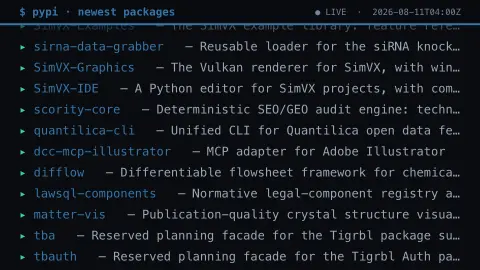
The Package Stream screensaver is a live stream of brand-new software packages published to the Python Package Index this minute, scrolling past in a terminal style, gathered from PyPI by the pipeline. It's free, runs in your browser, and ESC exits.
Live preview
Press ESC to leave fullscreen. Settings are saved in your browser only.
How the Package Stream screensaver works
A background pipeline reads the Python Package Index's public feed of newly published packages.
The saver streams them past like a build log — each package's name, version and a short summary.
Names glow in PyPI blue with the version dimmed beside them, in a monospace terminal style.
It refreshes every minute and feeds new packages in as developers publish them.
The Python Package Index and its ever-growing shelf
The Python Package Index, known as PyPI, is the public repository from which the pip tool downloads Python libraries. It is powered by Warehouse, an open source project developed under the Python Packaging Authority, and is maintained by the Python Software Foundation and the Python community, largely volunteers. PyPI offers RSS feeds of new packages and new releases, which is the kind of public feed this saver reads.
Each entry on screen has a name, a version and a one-line summary written by the author. Project names are unique, so only one project can hold a given name. PyPI blocks names that conflict with Python standard library modules and may reject names too similar to an existing project because they could be confusable.
A package appearing here is not a recommendation or a safety check. PyPI describes no general review of code before it is published; it can place projects or releases in quarantine when it suspects malicious activity or spam, and administrators must review them before they are restored. Before installing something unfamiliar, developers usually look at its source, maintainers and download history.
A worked example
The log scrolls by — ▸ requests 2.32 — Python HTTP for Humans, ▸ some-new-sdk 0.1.0 — … — a real-time view of open source being shipped to PyPI minute by minute.
Settings & tips
- Scroll speed sets how fast the stream moves.
- Accent recolours the package names.
- Run
automation/run.py packageson your pipeline machine to refresh the stream.
Frequently asked questions
- Is the stream live?
- Yes. It comes from the Python Package Index's public feed of new packages, refreshed every minute by the pipeline.
- What is PyPI?
- The Python Package Index is the main repository where developers publish Python software for others to install.
- Why does it use a pipeline?
- The PyPI feed is served as a feed file rather than a browser-friendly API, so a background script reads it and saves a snapshot.
- Are these all brand new?
- Yes — it shows the newest packages published, so you're watching open source ship in near real time.
- Is it free?
- Yes — free, no download, in your browser.
- Can anyone upload to PyPI?
- Anyone who registers an account can publish a project. That openness is why the index is so broad and why its contents vary so much in quality and purpose.
- Who writes the summary line?
- The author of the project. It comes from the package's own metadata and is not written or reviewed by the saver.
- Is every package on this list safe to install?
- No. Appearing in the stream says nothing about safety or quality. PyPI can quarantine projects suspected of malicious activity, but you should still check an unfamiliar package yourself.