GitHub Trending Screensaver
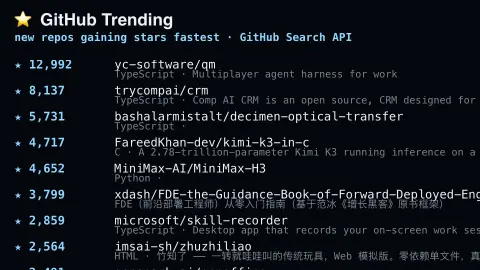
The GitHub Trending screensaver boards real repositories gaining stars fastest right now, drawn live and key-less from GitHub's own public search API. It's free, runs in your browser, and ESC exits.
Live preview
Press ESC to leave fullscreen. Settings are saved in your browser only.
How the GitHub Trending screensaver works
The saver queries GitHub's public search API for recently created repositories sorted by real star count, with no key required.
Each repository scrolls through with its name, language and real star count.
Filter by language, or leave it open to every language.
The board refreshes periodically to track real, current momentum.
What a GitHub star measures
GitHub is a large host of open-source code. Starring a repository is a way to bookmark it, since it makes the repository easy to find again later, and also to show appreciation to its maintainers. GitHub also uses starred repositories to suggest similar content, and star counts feed into its repository rankings.
The meaning of a count is looser than it looks. A star is not a download, a user or an endorsement of quality. A repository can collect stars quickly because of attention rather than use, and fake stars are a documented problem: a 2024 Carnegie Mellon–led study (arXiv 2412.13459) flagged about 4.5 million suspected fake stars across thousands of repositories. A high count alone is therefore not proof of real adoption.
Language, shown for each repository, comes from GitHub’s Linguist library, which detects the language of files and produces a language breakdown by share. A project that mixes several languages is summarised by that breakdown, so the label may hide secondary languages. Browsing new, fast-rising projects is a good way to notice emerging tools, but a project with momentum may also be experimental and unfinished.
A worked example
Filter to Rust and the board fills with real repositories currently picking up stars fast in that ecosystem — genuine GitHub search results, not a curated pick.
Settings & tips
- Language narrows the board to one programming language.
- Accent recolours the star counts.
- This is distinct from the site's GitHub Pulse saver, which shows the raw global event firehose.
Frequently asked questions
- How is this different from GitHub Pulse?
- GitHub Pulse shows the raw global commit/event firehose; this ranks real repositories by how fast they're gaining stars.
- Is a key needed?
- No. GitHub's public search API allows light, key-less use.
- Is this an official "trending" feed?
- GitHub's own Trending page has no public API, so this approximates it honestly using real, live search results sorted by star velocity.
- Is it free?
- Yes — free, no download, in your browser.
- Is a repository with more stars better?
- Not necessarily. Stars reflect attention at some moment, and mature, reliable projects can have few while a viral demo has many.
- How does GitHub decide a repository’s language?
- GitHub uses its Linguist library to detect the language of files and report a breakdown of languages by share, so a single label can hide secondary languages.
- Are all stars real?
- No. Researchers have identified millions of suspected fake stars used to promote repositories, so treat a large count with caution.