Pixel Solar System Screensaver
The Pixel Solar System screensaver shows the planets and about a thousand real catalogued asteroids at their computed positions right now, drawn as pixel art. It's free, runs in your browser, and ESC exits.
Live preview
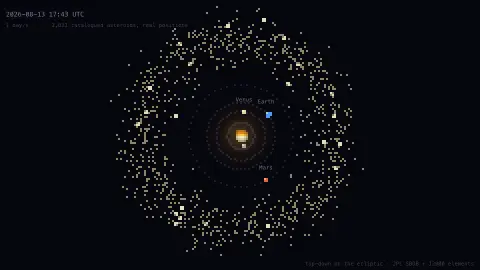
Press ESC to leave fullscreen. Settings are saved in your browser only.
How the Pixel Solar System screensaver works
Planet positions are solved on your device from JPL's J2000 mean orbital elements, the same table the Orrery uses.
The asteroid belt is not decorative. About a thousand numbered main-belt asteroids are pulled from JPL's Small-Body Database with their own orbital elements, and each one is propagated from the catalogue epoch to the current instant.
Positions were checked against JPL Horizons: Ceres, Vesta and Pallas all land within about 0.002 AU of Horizons' own numbers, the expected residual for two-body elements.
It is a flat map looking down on the ecliptic, so a body's height above or below the plane is not shown — Pallas is tilted 35° and you cannot see that here.
Osculating elements and the main belt
The planets here are placed using JPL's table of mean orbital elements, while the thousand asteroids come from the Small-Body Database. Each entry has a handful of numbers: the semi-major axis, which sets the size of the orbit, the eccentricity, how stretched it is, the inclination, and angles that fix where the ellipse sits and where the body is along it at a reference epoch. Everything else is calculation from those few values.
The asteroid elements are osculating, from the Latin for kissing, because they describe the ellipse that matches the body's position and velocity at one instant. Planets perturb each other and the asteroids, so a real orbit slowly departs from that ellipse. That is why positions carry a small error that grows with distance from the epoch, and why professional ephemerides integrate the motion numerically.
The main belt lies roughly between the orbits of Mars and Jupiter. Its total mass is only about 3% of the Moon's, and four objects, Ceres, Vesta, Pallas and Hygiea, hold about 62% of it. Pictured on a map the belt looks crowded, but the average spacing between asteroids is hundreds of thousands of kilometres, and the chance of a probe hitting one is far below one in a billion. Pixel scale exaggerates sizes, and the layout shows a single moment in time.
A worked example
The belt is the point. Drawn from real elements it is not a tidy ring but a broad, clumpy band — denser toward the inner edge, with thin lanes where the Kirkwood gaps fall at orbital resonances with Jupiter. A randomly scattered belt would look almost the same and would mean nothing.
Settings & tips
- Time-lapse runs from live up to a month per second — the inner planets lap visibly while Jupiter barely moves.
- Field of view switches between the inner system with the belt, and the full system out to Neptune.
- Press ESC to leave fullscreen.
Frequently asked questions
- Is this real data?
- Yes. Planets come from JPL's J2000 elements and the belt from JPL's Small-Body Database, propagated on your device. Nothing is simulated or scattered at random.
- Is a key needed?
- No. Both sources are fully key-less.
- Why can't I see orbital tilt?
- It's a top-down map of the ecliptic plane, so height above the plane isn't drawn. The tilt is still used when computing each body's position.
- How much of the main belt is shown?
- Only a sample of roughly a thousand numbered asteroids is plotted. JPL's database lists over a million main-belt asteroids, so the sample is a small fraction.
- What is an astronomical unit?
- It is a unit of length defined as 149,597,870,700 metres, close to the average Earth-Sun distance, or about 150 million kilometres. Orbits in the solar system are conveniently measured in it.