Pilot Reports Screensaver
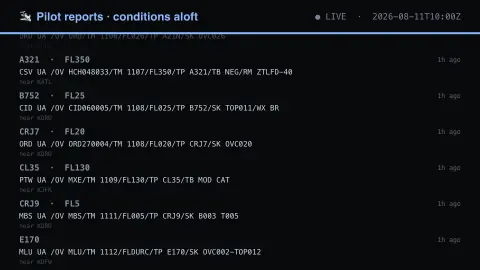
The Pilot Reports screensaver shows pilot reports of conditions aloft, swept across several US hubs by the pipeline. PIREPs are filed in a terse code and shown as filed, because that is how pilots read them. It's free, runs in your browser, and ESC exits.
Live preview
Press ESC to leave fullscreen. Settings are saved in your browser only.
How the Pilot Reports screensaver works
The background pipeline reads this from the NOAA Aviation Weather Center and saves a snapshot the saver loads.
Pilot reports of conditions aloft, swept across several US hubs by the pipeline.
It refreshes on a schedule, so what you see stays current.
Colours can be changed in settings; nothing is stored beyond your own browser.
How to read a PIREP
A PIREP, or pilot report, is a voluntary observation radioed in by a crew about what they are actually flying through: turbulence, icing, cloud tops, visibility or a smooth ride. The US NOAA Aviation Weather Center distributes them, and they matter because forecasts and ground sensors cannot see conditions aloft between stations.
The raw line is a compact code of slash-separated fields. /OV is the location, often a bearing and distance from a navaid or airport, /TM is the time in UTC, /FL is the flight level, and /TP is the aircraft type. /SK gives sky cover and /TB or /IC report turbulence and icing when present. A flight level is pressure altitude in hundreds of feet, so FL026 is about 2,600 ft. A leading UA marks a routine report; UUA marks an urgent one.
Under FAA handling rules, urgent reports cover hazards such as tornadoes, funnel clouds and waterspouts, severe or extreme turbulence, severe icing, hail and low-level wind shear. Reports are subjective and sporadic: one crew’s moderate turbulence may be another’s light chop, and coverage depends on crews choosing to file, so an empty area does not mean calm air.
A worked example
Pilot reports of conditions aloft, swept across several US hubs by the pipeline. PIREPs are filed in a terse code and shown as filed, because that is how pilots read them.
Settings & tips
- Accent and Background recolour the display.
- Run
automation/run.py pirepsto refresh the feed. - Press ESC to leave fullscreen.
Frequently asked questions
- Is this real data?
- Yes — it comes from the NOAA Aviation Weather Center and is refreshed on a schedule.
- Why is the text so cryptic?
- PIREPs are filed in a standard abbreviated format and shown as filed, because that is how pilots and dispatchers read them.
- Is a key needed?
- No. This source is fully key-less.
- Is it free?
- Yes — free, no download, in your browser.
- What does FL075 mean?
- It is a flight level, altitude in hundreds of feet on a standard pressure setting, so FL075 is roughly 7,500 feet.
- What is the difference between UA and UUA?
- UA is a routine pilot report. UUA is an urgent one, used for hazards such as tornadoes and funnel clouds, severe or extreme turbulence, severe icing, hail and low-level wind shear.
- Why are there so few reports in some places?
- PIREPs depend on a crew choosing to file one, so coverage is uneven. The absence of a report is not evidence that conditions are good.