Orbital Charges Screensaver
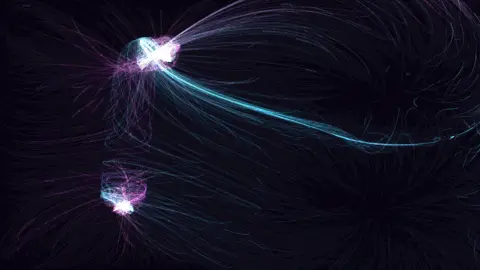
Orbital Charges is a free, in-browser screensaver where four to seven inverse-square attractors and repellers are scattered across the screen. The force is kept at its real magnitude rather than flattened to a direction, so particles genuinely speed up as they fall into a well and slingshot back out in long cometary streaks and looping rosettes. Nothing to download, and ESC exits at any time.
Live preview
Press ESC to leave fullscreen. Settings are saved in your browser only.
How the Orbital Charges screensaver works
Each charge pulls or pushes with an inverse-square force, the same law as gravity and electrostatics: strong close in, weak far away. Most are attractors, a few are repellers, and the field at any point is the vector sum of all of them.
Almost every other Driftfield field normalises its direction to unit length, so particles move at a steady speed. This one deliberately keeps the magnitude, clamped to a maximum, so a particle approaching a well accelerates the way a comet does near the sun, whips around it, and decelerates on the way out. The clamp is what stops a direct hit flinging it off-screen in one frame.
A small softening term near each charge keeps the force finite at the centre. Damping is on, so nothing orbits forever: particles fall in, loop out, and eventually settle into rosette-shaped paths between the wells until their lifespan ends and they respawn.
The charges are fixed by the seed and do not move; Evolve only acts through a blended noise field. The picture is therefore a map of the wells being redrawn continuously by streaks of light.
Inverse-square forces and slingshot orbits
An inverse-square law means a force falls in proportion to the square of the distance: double the separation and the pull drops to a quarter. Isaac Newton used it for gravity in his Principia of 1687, and Charles-Augustin de Coulomb found the same form for electric forces in the 1780s. Because the pull grows steeply at short range, particles passing close to a charge are accelerated far more than those passing far away.
The curved paths come from the interplay of speed and direction. A particle coming in off-centre does not fall straight in: it swings around the attractor and may leave on a new heading, the effect spacecraft use in gravity assists to pick up speed from a planet. With several attractors and repellers, the motion is not a tidy ellipse as in the two-body problem solved by Newton. Three or more interacting bodies generally have no closed-form solution and can produce chaotic orbits, the many-body problem.
Around a single attracting mass, the bound orbits of an inverse-square force are closed. Here, damping drains energy, so paths spiral inward rather than repeat, and a softening term stops forces becoming infinite as the distance goes to zero, a standard trick in numerical simulations. The charges are fixed in place, so what you see is test particles in a static field, not bodies pulling on each other.
A worked example
At the defaults — Ultraviolet palette, 2200 particles, Trail 62 — violet and cyan streaks converge on five or six invisible wells, brighten as they accelerate in, and fan out in petal-shaped loops around each. Raise Speed to 2 and the slingshots become long comet tails crossing the whole screen; drop it to 0.5 and the particles settle into tight, slow rosettes around each charge.
Settings & tips
- Short trails (30–40) show the speed changes best: streaks brighten and stretch near each well.
- Blend in Simplex drift at 25% to add a slow background wind that keeps particles from settling.
- Reseed for a new arrangement of attractors and repellers; some seeds give a single dominant well.
Frequently asked questions
- Why do particles speed up near the charges?
- Because the force magnitude is preserved instead of normalised. Most flow fields only give a direction; this one gives a strength too, so particles accelerate under an inverse-square pull just as an object does falling toward a planet.
- Is the Orbital Charges screensaver free?
- Yes. It runs free in your browser with nothing to download or install, and it works offline once the page has loaded.
- What does the Seed setting do?
- Everything is deterministic from the seed: the noise table, where the field’s features land and the order particles spawn in. Leave it blank for a fresh random layout on every run, or type any short word or number to get the same layout back each time.
- Why does the image ripple when I move the mouse?
- The cursor and a lagging echo of it act as two wave sources. Their interference pattern nudges nearby particles onto the bright fringes and dims the dark ones, so the flow visibly reacts to you. Turn off Cursor ripples in the settings if you want the field left alone.
- How do I exit the Orbital Charges screensaver?
- Press the ESC key at any time to leave fullscreen and return to the page.
- What is a gravity assist?
- It is a manoeuvre in which a spacecraft passes close to a moving planet and gains or loses speed relative to the sun, saving fuel. The planet’s motion supplies the energy.
- Why is the three-body problem hard?
- With three or more interacting masses there is generally no closed-form solution, and small differences in starting conditions can lead to very different paths.
- Why add softening to the force?
- At very small distances an inverse-square force becomes huge, which would cause numerical blow-ups. Softening caps it so the simulation stays stable.