The Boring Things Screensaver
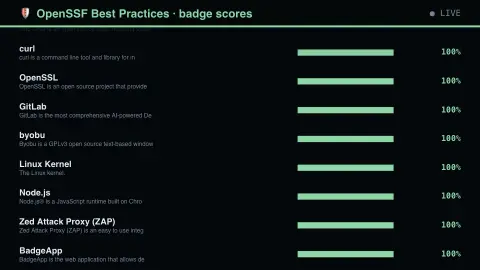
The Boring Things screensaver ranks open source projects by their OpenSSF Best Practices badge percentage — a self-assessment against roughly a hundred criteria covering vulnerability reporting, static analysis, automated testing and reproducible builds. It runs in the browser with nothing to install; press ESC to exit.
Live preview
Press ESC to leave fullscreen. Settings are saved in your browser only.
How the The Boring Things screensaver works
The saver reads The OpenSSF Best Practices badge API, key-free.
No account and no key: the request goes straight from your browser, or from this site's own refreshed copy of the feed where the source does not permit browser access.
Values are drawn on a canvas that resizes with the window, so it works on a laptop or a wall display.
If the source is unreachable the saver says so on screen rather than showing stale numbers as though they were current.
The OpenSSF Best Practices badge
The Open Source Security Foundation, a project of the Linux Foundation, hosts the OpenSSF Best Practices Badge, a web application where free and open-source projects self-certify that they meet a set of security-focused practices and then display a badge. It was originally developed under the Core Infrastructure Initiative and called the CII Best Practices badge; the site now lives at bestpractices.dev.
There are three levels in the main series: passing, silver and gold, each stricter than the last. Passing covers basics such as a stable website, an open-source licence, HTTPS and a documented vulnerability-reporting process. Silver adds items like documented governance and 80 percent statement test coverage, and gold includes reproducible builds, two-factor authentication and a security review. The percentage on screen is the share of criteria met so far.
Because projects certify themselves, the badge states what the project says about itself, not an independent audit. A project can score highly while still containing bugs, and a respected library may have no badge simply because nobody filled in the form. The number measures process hygiene, which is related to but not the same as the security of the code.
A worked example
Each project shows its name, a one-line description and a bar scaled to its badge percentage — green at 100%, amber above 70, orange below. The badge measures process, not code quality, which is precisely why it is interesting: most security failures are process failures rather than clever exploits.
Settings & tips
- Accent and Background recolour the display without changing the data.
- Add it to a Multi-view grid to watch it alongside other live savers.
- Press ESC at any time to leave fullscreen.
Frequently asked questions
- Is a 100% badge a guarantee of security?
- No. It is a self-assessment that the project has documented and automated the practices known to reduce risk. It says nothing about whether the code contains a vulnerability today.
- Who awards the badge?
- Projects self-certify against published criteria and the OpenSSF hosts the register. The criteria are objective enough that the claims are checkable, and the whole register is public.
- Is this real data?
- Yes. It comes from The OpenSSF Best Practices badge API, key-free. Nothing is invented or simulated, and if the source cannot be reached the saver reports that instead of drawing something plausible.
- Does it cost anything or need an account?
- No. Every screensaver here is free, runs in the browser and needs no sign-up. This one uses a public API that requires no key.
- What are the badge levels?
- Passing, silver and gold. Each adds more demanding criteria; gold, for example, includes reproducible builds and two-person review of changes.
- Do projects have to apply?
- Yes. A badge entry exists only because someone from the project filled in the form, so many strong projects have none.
- Is the percentage shown an average of all projects?
- No. It is the completion level for one project's checklist, not a comparison across projects.