Which Centre Did The Work Screensaver
The Which Centre Did The Work screensaver shows reports from the NASA Technical Reports Server, key-less. The field centre is the most informative thing on a NASA record — Ames does life sciences and aeronautics, Marshall propulsion, Goddard Earth and astrophysics — so it is drawn as the primary tag. The size parameter is accepted and ignored, so the page is taken as given rather than paged. It's free, runs in your browser, and ESC exits.
Live preview
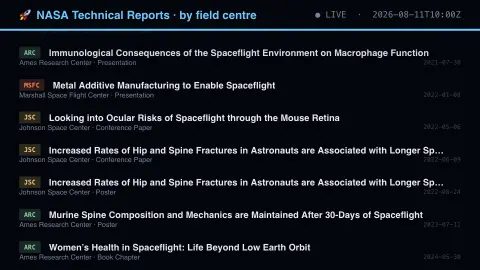
Press ESC to leave fullscreen. Settings are saved in your browser only.
How the Which Centre Did The Work screensaver works
The saver reads the source described above and draws it on a canvas — no account, no tracking.
Reports from the NASA Technical Reports Server, key-less. The field centre is the most informative thing on a NASA record — Ames does life sciences and aeronautics, Marshall propulsion, Goddard Earth and astrophysics — so it is drawn as the primary tag. The size parameter is accepted and ignored, so the page is taken as given rather than paged.
It refreshes on a schedule, so what you see stays current.
Colours can be changed in settings; nothing is stored beyond your own browser.
Reading a NASA Technical Reports record
The NASA Technical Reports Server, known as NTRS, is NASA's repository of scientific and technical information, also called the NASA STI Repository. It was first released in 1994 and relaunched in 2020. It holds metadata records, full-text documents and videos, covering NASA STI series reports, abstracts, book chapters, conference papers, contractor and grantee reports, journal articles and patents. Its National Advisory Committee for Aeronautics (NACA) collection covers reports from 1900 to 1958, so the record reaches back to NASA's predecessor.
The centre tag is the useful clue on the board, because it shows which NASA field centre a record is attached to. That label points to where the work is associated, not necessarily to where a mission is operated. The repository is large: NASA describes more than 4.4 million metadata records but a far smaller number of full-text documents, over 500,000, which is why many entries are only a citation and an abstract.
Access to full text varies. NASA states that its complete collection is available by registration only to NASA civil servants and contractors, while a public collection, PubSpace, holds peer-reviewed NASA-funded publications. Older documents and abstracts that point to papers published elsewhere may carry very little metadata.
A worked example
Reports from the NASA Technical Reports Server, key-less. The field centre is the most informative thing on a NASA record — Ames does life sciences and aeronautics, Marshall propulsion, Goddard Earth and astrophysics — so it is drawn as the primary tag. The size parameter is accepted and ignored, so the page is taken as given rather than paged.
Settings & tips
- Accent and Background recolour the display.
- Every value on screen comes from the live source — nothing is simulated.
- Press ESC to leave fullscreen.
Frequently asked questions
- Is this real data?
- Yes — it comes from the source named on this page and is refreshed on a schedule.
- Is a key needed?
- No. This source is fully key-less.
- Is it free?
- Yes, and it runs entirely in your browser.
- What do the centre labels mean?
- They name the NASA field centre a record is associated with, such as Ames, Marshall or Goddard, and the board uses that as the main tag.
- Are the full documents available?
- Not always. Many records are metadata only, and NASA says the complete collection is restricted to registered NASA civil servants and contractors, while some material is public, so availability varies by record.
- Does a document type like Book Chapter mean it is a NASA book?
- Not necessarily. It is the category of output catalogued, and NTRS lists book chapters alongside reports, journal articles and conference papers.