ListenBrainz Charts Screensaver
The ListenBrainz Charts screensaver shows the week's most-played artists across all of ListenBrainz, key-less. It's free, runs in your browser, and ESC exits.
Live preview
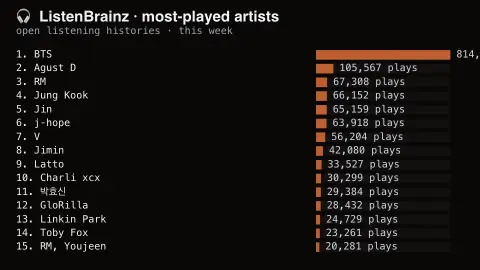
Press ESC to leave fullscreen. Settings are saved in your browser only.
How the ListenBrainz Charts screensaver works
The saver reads the source described above and draws it on a canvas — no account, no tracking.
The week's most-played artists across all of ListenBrainz, key-less. These are actual listens from real accounts on the open listening-history project, so the ordering favours whoever has the most devoted listeners rather than the biggest marketing budget.
It refreshes on a schedule, so what you see stays current.
Colours and any options can be changed in settings; nothing is stored beyond your own browser.
What ListenBrainz counts
ListenBrainz is an open project of the MetaBrainz Foundation, the organisation behind the MusicBrainz music database. It keeps a public log of the music users listen to and uses that data for statistics and recommendations. Each play submitted is a listen, and the data can be fetched through a public API.
The saver reads the site-wide artist chart for the past week. The statistics API ranks artists by listen_count, the total number of listens across all users in the chosen range, and calculates only the top 1,000 artists for each time period. That is a count of plays by ListenBrainz users, not sales, streams on one store or radio spins, so the ranking reflects the habits of that particular community and can differ sharply from mainstream charts.
Because the user base is self-selected, the numbers describe those users, not all listeners. A very active account can add many listens for one artist, and the rankings are only as accurate as the matching of submitted listens to the right artist.
A worked example
The week's most-played artists across all of ListenBrainz, key-less. These are actual listens from real accounts on the open listening-history project, so the ordering favours whoever has the most devoted listeners rather than the biggest marketing budget.
Settings & tips
- Accent and Background recolour the display.
- Every number on screen comes from the live source — nothing is simulated.
- Press ESC to leave fullscreen.
Frequently asked questions
- Is this real data?
- Yes — it comes from the source named on this page and is refreshed on a schedule.
- Is a key needed?
- No. This source is fully key-less.
- Is it free?
- Yes — free, no download, in your browser.
- How is this chart different from Spotify or Billboard?
- It counts listens submitted by ListenBrainz users, not total streams or sales. The audience is smaller and more specialised, so the results can look quite different.
- What is a listen?
- A recorded play of a track by a user, submitted to ListenBrainz. The chart ranks artists by their total listen count across all users in the chosen time range.
- Can one person skew the chart?
- A very active account can add many listens for one artist, which can move a weekly ranking. With a smaller community, individual habits matter more.