Blocked From Here Screensaver
The Blocked From Here screensaver shows web-connectivity anomalies measured by OONI volunteers on their own connections, key-less. It’s free, runs in your browser, and ESC exits.
Live preview
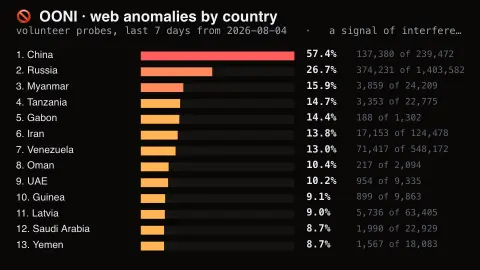
Press ESC to leave fullscreen. Settings are saved in your browser only.
How the Blocked From Here screensaver works
The saver reads the source described above and draws it on a canvas — no account, no tracking.
Web-connectivity anomalies measured by OONI volunteers on their own connections, key-less. A map of two things at once: where interference happens, and where people have installed a probe. A broken site looks much the same from outside.
It refreshes on a schedule, so what you see stays current.
Colours and any options can be changed in settings; nothing is stored beyond your own browser.
How OONI measures web blocking
OONI, the Open Observatory of Network Interference, is a non-profit free software project founded in 2012 that works to document internet censorship around the world. Volunteers and other contributors run the OONI Probe app on their own networks, and the test results are published as open data.
For each website, the Web Connectivity test runs the same steps from the user's own network and from a control server, then compares them. It checks the DNS answers, whether a TCP connection can be opened to the returned addresses, and the HTTP response. Different DNS answers suggest DNS blocking, a failed TCP connection suggests TCP/IP blocking, and a failed request or a different status code or page suggests blocking at the HTTP level. An anomaly is a result that differs from the control; confirmed is a stricter label than that.
An anomaly is only a signal. OONI itself warns of false positives, for example when resolvers return geographically closer addresses or sites serve different content by country, and outages look similar from the outside. Coverage also depends on where probes run and which sites the test lists include, so a country with few measurements, or few anomalies, is not necessarily free of blocking.
A worked example
Web-connectivity anomalies measured by OONI volunteers on their own connections, key-less. A map of two things at once: where interference happens, and where people have installed a probe. A broken site looks much the same from outside.
Settings & tips
- Accent and Background recolour the display.
- Every value on screen comes from the live source — nothing is simulated.
- Press ESC to leave fullscreen.
Frequently asked questions
- Is this real data?
- Yes — it comes from the source named on this page and is refreshed on a schedule.
- Is a key needed?
- No. This source is fully key-less.
- Is it free?
- Yes, and it runs entirely in your browser.
- What is the difference between anomaly and confirmed?
- An anomaly is a result that differs from the control measurement. Confirmed is a stricter label, used when the evidence goes beyond a mere difference.
- Does a high rate prove censorship?
- No. It indicates more unusual results, which could come from censorship but also from outages or sites that serve different content by region.
- Who runs the measurements?
- People around the world run OONI Probe on their own connections, and OONI publishes the results as open data.