Homebrew Package Popularity Screensaver
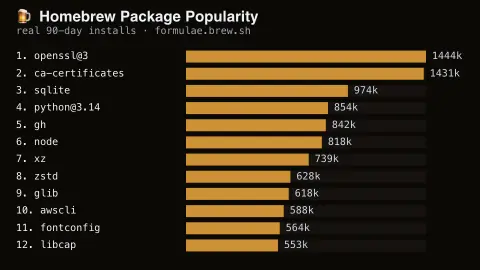
The Homebrew Package Popularity screensaver ranks macOS packages by their real recent install count, from Homebrew's own published analytics. It is free, runs in your browser, and ESC exits.
Live preview
Press ESC to leave fullscreen. Settings are saved in your browser only.
How the Homebrew Package Popularity screensaver works
The saver reads real formula install-count analytics published by the Homebrew project.
Packages are ranked by their real reported install count, highest first.
The pipeline refreshes the board on Homebrew's own analytics regeneration schedule.
No key is required for this key-less public endpoint.
What Homebrew install analytics count
Homebrew is a package manager for macOS and Linux, and its maintainers publish aggregate analytics about what people install. Homebrew shows a notice before analytics are enabled, and users can opt out with brew analytics off, so the data covers only people who have not. The public reports at formulae.brew.sh come in 30-day, 90-day and 365-day views, and the formula install report lists each formula with a count and its percentage share of all installs in the window.
Packages that other packages depend on rank high largely because of dependencies. Install events record whether a package was explicitly requested or installed only to satisfy another package, so a shared library is counted each time any program that needs it is installed. Homebrew also publishes a separate install-on-request report, which is the better view of what people chose deliberately.
Each event also records whether Homebrew was running in CI, so automated environments are part of what the analytics see. The counts therefore reflect a self-selected sample of installs, not the full user base. They are events, not distinct machines, and they do not tell you how many people use a package.
A worked example
A widely-used formula with millions of real installs tops the ranked board, exactly matching Homebrew's own published figure.
Settings & tips
- Install counts are real anonymized usage analytics, not simulated rankings.
- Accent recolours the ranking bars.
- The analytics file is regenerated daily by the Homebrew project.
Frequently asked questions
- Is this real Homebrew data?
- Yes — real install-count analytics published by the Homebrew project.
- Is a key needed?
- No. Homebrew's analytics JSON is fully key-less.
- Is this live, real-time data?
- It's real but periodically regenerated, not a live per-second event stream.
- Is it free?
- Yes — free, no download, in your browser.
- Why do libraries outrank well-known tools?
- Dependencies are counted whenever a program that needs them is installed, so widely shared libraries accumulate counts quickly. Homebrew’s install-on-request report shows only packages that were explicitly requested.
- Do CI systems affect the numbers?
- They can. Each analytics event records whether Homebrew ran in CI, so automated runs are among the events Homebrew receives.
- What does the percentage mean?
- It is the package’s share of total counted formula installs in the reporting window, not the share of users who have it installed.