GitHub Live Activity Feed Screensaver
The GitHub Live Activity Feed screensaver streams real public GitHub events as they happen. It is free, runs in your browser, and ESC exits.
Live preview
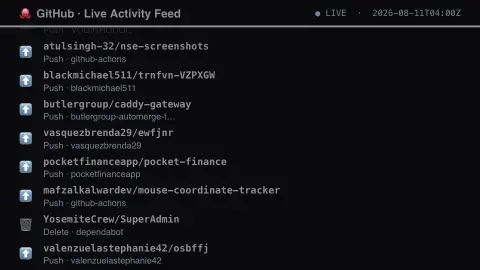
Press ESC to leave fullscreen. Settings are saved in your browser only.
How the GitHub Live Activity Feed screensaver works
The saver reads real recent public events from GitHub's own Events API.
Each entry shows a real event type, repository name and actor.
The pipeline refreshes the feed regularly within GitHub's rate limits.
No key is required for this key-less public endpoint.
What the GitHub public events stream is
GitHub’s Events API exposes a public timeline of recent activity. Its event types include pushes, issues, pull requests, forks, stars (WatchEvent), comments, releases, and the creation or deletion of branches and tags. Each event has a type, the repository it happened in and the account that did it, which are the fields on this display.
The feed is a sample rather than a record. GitHub’s documentation says event latency can range from 30 seconds to 6 hours depending on the time of day, that each timeline holds at most 300 events from the past 30 days, and that the API is not built for real-time use. A push event also does not tell you what the commits contain. Repository names may be in any language.
Seeing a repository here is not a sign of quality, popularity or safety, and the display gives no indication of what the code does. Treat it as a glimpse of GitHub’s activity, not a count.
A worked example
A real push event to a real public repository scrolls past exactly as GitHub logged it moments earlier.
Settings & tips
- Repositories, actors and event types are real, unfiltered GitHub activity.
- Accent recolours the ticker text.
- Only public events are shown, never private repository activity.
Frequently asked questions
- Is this real GitHub data?
- Yes — real public events from GitHub's own Events API.
- Is a key needed?
- No. The public Events API is fully key-less.
- Does this show private repos?
- No — only real public activity is ever visible via this API.
- Is it free?
- Yes — free, no download, in your browser.
- Is every public event shown?
- No. The API returns at most 300 events from the past 30 days, and events can lag by anywhere from 30 seconds to 6 hours, so the display is a sample, not a complete record.
- Does a push event show the code changed?
- No. The event records that a push occurred in a repository. It does not tell you what the commits contain.