RubyGems New Releases Screensaver
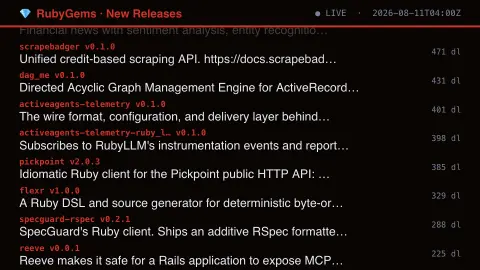
The RubyGems New Releases screensaver streams real newly-published RubyGems versions as they're reported. It is free, runs in your browser, and ESC exits.
Live preview
Press ESC to leave fullscreen. Settings are saved in your browser only.
How the RubyGems New Releases screensaver works
The background pipeline polls RubyGems.org — the official Ruby package registry — every few minutes for new records.
Each new item eases up into its slot at the bottom of the list as it arrives.
A header shows a live/connecting indicator and the last update time.
No key is required for this key-less public endpoint.
How RubyGems publishes versions
RubyGems.org is the public host for Ruby libraries, called gems. It is described as the Ruby community’s gem hosting service rather than a product of one company. Developers install gems with the gem command or list them in a Bundler Gemfile. Each gem has a name and a series of numbered versions.
The rows in this saver are individual versions, with the name, the version number and the short summary text the author wrote in the gem’s metadata. RubyGems does not enforce semantic versioning, but it is a widely followed convention: a major-number jump such as 1.4.2 to 2.0.0 signals incompatible changes. A version containing a letter, such as 1.0.0.rc1, is a pre-release, which installers skip unless asked, and new gems conventionally start at 0.1.0 until the API settles at 1.0.0.
Because publishing requires only an account, the stream includes everything from widely used libraries to personal experiments. Authors can yank a version, which removes it from the index so that gem install no longer finds it. Appearing in the list says nothing about reliability, popularity or security; it only says that a new version was pushed.
A worked example
A real recent item scrolls into view with its details, then eases upward as newer ones arrive behind it.
Settings & tips
- Each release shows the real gem name, version and download count.
- Accent recolours the header and highlights.
- RubyGems.org is the official package registry for the Ruby community.
Frequently asked questions
- Is this real data?
- Yes — it's read live from RubyGems.org, the official Ruby package registry.
- Is a key needed?
- No. This is a fully key-less public API.
- How often does it refresh?
- The pipeline polls for new records every few minutes.
- Is it free?
- Yes — free, no download, in your browser.
- What is a gem version versus a gem?
- A gem is the named library. A version is one specific numbered release of it, and every update creates a new version.
- What does yanking a version do?
- It removes the version from RubyGems.org’s index, so it is no longer available through gem commands. Authors use it when a release is broken or was published by mistake.
- What makes a version a pre-release?
- A letter in the version number, such as 1.0.0.rc1. Installers skip pre-releases unless you ask for them, for example with gem install --pre.