Published By Whitehall Screensaver
The Published By Whitehall screensaver streams the newest items published across UK government — guidance, statistics, consultations, press notices and policy papers — in publication order. It runs in the browser with nothing to install; press ESC to exit.
Live preview
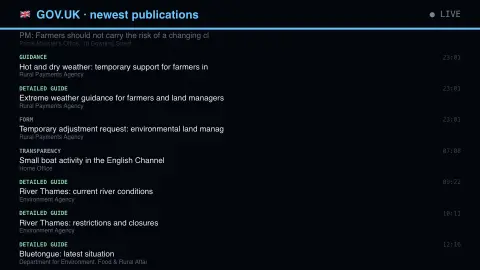
Press ESC to leave fullscreen. Settings are saved in your browser only.
How the Published By Whitehall screensaver works
The saver reads The GOV.UK search API, key-free.
No account and no key: the request goes straight from your browser, or from this site's own refreshed copy of the feed where the source does not permit browser access.
Values are drawn on a canvas that resizes with the window, so it works on a laptop or a wall display.
If the source is unreachable the saver says so on screen rather than showing stale numbers as though they were current.
What lives on GOV.UK
GOV.UK is the UK government's website, run by the Government Digital Service. It launched on 17 October 2012, replacing Directgov and the online services of Business Link, and was planned to absorb the separate websites of hundreds of departments and public bodies. Content is created by departments and agencies using shared publishing tools, one of which is an application called Whitehall Publisher, and it is then indexed by a central search service, which is what this screensaver reads.
The range of content is wide. GOV.UK groups it into areas such as news (stories, speeches, letters and notices), guidance and regulation, research and statistics, policy papers and consultations, and transparency data including Freedom of Information releases. The type of document shown tells you a lot about what it is: a consultation is a question, an outcome is a decision, and a statistics release is a dataset with commentary.
Scotland, Wales and Northern Ireland have devolved governments responsible for many domestic policy issues, and their content lives on separate sites: gov.scot, gov.wales and northernireland.gov.uk. Existing GOV.UK pages can be updated after first publication, and a change can alter what appears at the top of a list.
A worked example
Each row carries a colour-coded type badge, the title and the department that issued it. The badge is the informative part: detailed guides and notices are routine, national statistics arrive on a schedule, and a consultation outcome means a decision has just been taken on something people spent months arguing about.
Settings & tips
- Accent and Background recolour the display without changing the data.
- Add it to a Multi-view grid to watch it alongside other live savers.
- Press ESC at any time to leave fullscreen.
Frequently asked questions
- Is this really every department?
- Every organisation that publishes to GOV.UK, which is nearly all of central government plus a great many agencies and arms-length bodies. Devolved administrations publish on their own sites and are not included.
- What is a consultation outcome?
- The government's response after a public consultation closes, setting out what it heard and what it has decided to do. It is usually the moment a policy becomes real.
- Is this real data?
- Yes. It comes from The GOV.UK search API, key-free. Nothing is invented or simulated, and if the source cannot be reached the saver reports that instead of drawing something plausible.
- Does it cost anything or need an account?
- No. Every screensaver here is free, runs in the browser and needs no sign-up. This one uses a public API that requires no key.
- Does GOV.UK include Scottish, Welsh and Northern Irish government content?
- Only partly. The devolved governments run their own websites (gov.scot, gov.wales and northernireland.gov.uk) for matters within their control, so a lot of that material is not in this feed.
- What is the difference between guidance and a policy paper?
- Guidance tells people how to do something or how rules apply, while a policy paper sets out what the government intends to do or has decided.
- Can an item appear again after being updated?
- Pages on GOV.UK can be revised after first publication, and a revision may change an item's position in a list ordered by date, so repeated titles are possible.