Google Trends Screensaver
The Google Trends screensaver shows the day's trending searches for your chosen country as a colorful mosaic of tiles that flip to cycle through more trends than fit on screen. It reads from a content file the included pipeline fills from Google Trends RSS, so when the page is hosted online the trends stay current. It needs internet for live data and shows a clear notice when the file is unavailable; it is free, runs in your browser, and ESC exits.
Live preview
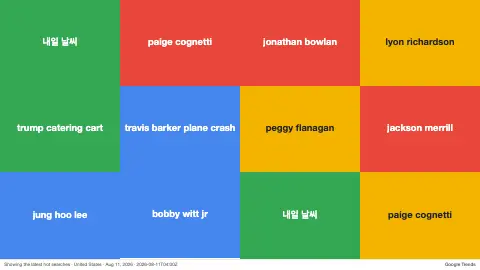
Press ESC to leave fullscreen. Settings are saved in your browser only.
How the Google Trends screensaver works
On start the saver fetches content/trends.json, a file the bundled pipeline fills from Google Trends RSS. It picks the country you selected, takes that country's list of trending search terms and their traffic counts, and lays them out as a grid of colored tiles sized to fill the screen neatly.
Each tile shows a trending search and, optionally, its traffic. Because there are usually more trends than tiles, individual tiles periodically flip with a 3D rotation and reveal a trend that is not currently on screen — so the mosaic keeps cycling through the full list without ever showing a duplicate.
A header stamp shows the country, the date and the update time. The saver re-reads the file as the pipeline refreshes it. If content/trends.json cannot be loaded — for example offline or opened from a file — it shows a plain “trends.json unavailable” message instead of failing.
What trending searches measure
Google Trends is a public tool from Google that shows how interest in searches changes over time and across places. Its trending-searches view highlights queries whose traffic jumped significantly among all searches over roughly the past 24 hours, which is a measure of acceleration, not of overall volume. A perennially popular search may never trend, while an obscure phrase can leap onto the list if interest suddenly multiplies.
Each entry carries an approximate traffic figure, a bucketed value such as “200+” rather than an exact count, since exact search counts are not shown. Lists exist for more than 100 countries and regions, so the same moment can produce very different tiles in different places, shaped by local sport, entertainment, weather and politics. Google’s own lists are refreshed frequently, on average about every ten minutes.
A few cautions help when reading the tiles. Trending is not the same as important or true: a spike in searches about a rumour measures curiosity about it. Search terms can be misspelled, truncated or ambiguous. The saver shows a snapshot from a specific refresh, so by the time you notice a term, the moment may have passed.
A worked example
With the defaults — country United States, 16 tiles, flip speed 4 and traffic counts on — the screen fills with a roughly 4×4 mosaic of brightly colored tiles, each showing a trending search with an “↑” traffic count; every couple of seconds a random tile flips on its axis and swaps in a fresh trend from the list.
Settings & tips
- Use the Country selector to switch between trending searches for the US, UK, India, Japan and many more.
- Raise the Tiles slider to fill a big screen with more trends at once, or lower it for larger, more readable tiles.
- Turn off Show traffic for a cleaner look, or increase Speed to make the tiles flip and cycle through trends faster.
Frequently asked questions
- Where do the trending searches come from?
- They come from content/trends.json, a file the included pipeline fills from Google Trends RSS. The saver re-reads it as the pipeline refreshes.
- Can I see trends for a different country?
- Yes. Use the Country selector to choose from many countries including the US, UK, Canada, India, Japan and more.
- Does the Google Trends screensaver work offline?
- It needs internet to load fresh trends. When the file cannot be reached it shows a trends.json unavailable notice instead of breaking.
- Why do the tiles keep flipping?
- There are usually more trends than tiles, so tiles flip to cycle in trends that are not currently shown, never repeating one already on screen.
- Is it free and how do I exit it?
- Yes, it is free and runs entirely in your browser. Press ESC at any time to exit.
- Is a trending search the most searched term?
- Not necessarily. Trending searches highlight queries whose traffic jumped sharply, whereas Google’s separate top charts cover topics with high overall volume. Steady, high-volume searches may never appear as trends.
- Why are the traffic figures rounded?
- Google shows bucketed approximations of search traffic rather than exact counts, so a figure should be read as a rough size, not a precise number.
- Do the lists differ between countries?
- Yes. Google publishes trending searches per country or region, so what trends in one place may not appear in another.