GitLab Top Projects Screensaver
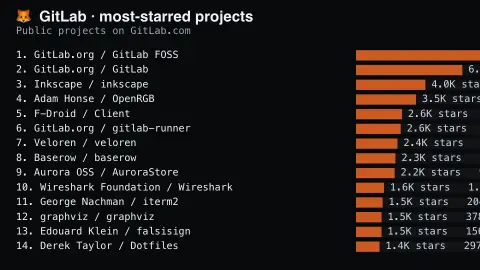
The GitLab Top Projects screensaver shows the most-starred public projects on GitLab.com, read key-less from its own API — a noticeably different mix of what people build than the site's GitHub feeds show. It's free, runs in your browser, and ESC exits.
Live preview
Press ESC to leave fullscreen. Settings are saved in your browser only.
How the GitLab Top Projects screensaver works
The saver reads the GitLab API directly in your browser — no key and no account.
The most-starred public projects on GitLab.com, read key-less from its own API — a noticeably different mix of what people build than the site's GitHub feeds show..
It refreshes on a schedule, so what you see stays current.
Colours can be changed in settings; nothing is stored beyond your own browser.
What GitLab's star ranking reveals
GitLab is a platform for hosting source code, issue tracking and continuous integration, available as a hosted service at GitLab.com and as software organisations run themselves. This saver covers only the public projects on GitLab.com, ordered by the number of stars users have given them. GitLab describes starring as a way to make projects you use frequently easier to find, so the ranking is a measure of attention rather than usage.
The mix looks different from the GitHub leaderboards because the community is different. Some highly starred entries are the official home of a project, while others may be mirrors of repositories whose canonical version lives elsewhere. GitLab supports both push mirroring, which copies a GitLab repository to another location, and pull mirroring, which brings in a repository from another host.
Stars accumulate over time, so older projects and those that were once promoted can hold their places even if activity has slowed. A project run only on a private or self-managed GitLab server cannot appear here, however popular, because the list covers GitLab.com alone. The list is a partial view of open source, not a census.
A worked example
The most-starred public projects on GitLab.com, read key-less from its own API — a noticeably different mix of what people build than the site's GitHub feeds show.
Settings & tips
- Accent and Background recolour the display.
- Data comes straight from the GitLab API in your browser.
- Press ESC to leave fullscreen.
Frequently asked questions
- Is this real data?
- Yes — it comes from the GitLab API and is refreshed on a schedule.
- Is a key needed?
- No. This source is fully key-less.
- Is it free?
- Yes — free, no download, in your browser.
- Why are some GitLab projects mirrors?
- GitLab supports mirroring in both directions: a repository can be copied from another host into GitLab, or pushed out from GitLab. A mirror can collect stars without being the primary development home.
- Can self-hosted GitLab projects appear?
- No. Only public projects on GitLab.com are included, so those on self-managed instances are invisible.
- Do stars measure how many people use a project?
- No. Starring is a bookmark that makes a project easier to find, so it records interest, not installs or active use.