GitHub Hourly Activity Screensaver
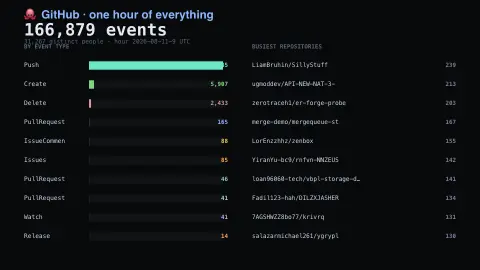
The GitHub Hourly Activity screensaver shows one complete hour of public activity across all of GitHub, tallied by the pipeline from the GH Archive dumps: how many events, how many distinct people, which kinds of action and which repositories were busiest. It's free, runs in your browser, and ESC exits.
Live preview
Press ESC to leave fullscreen. Settings are saved in your browser only.
How the GitHub Hourly Activity screensaver works
The background pipeline reads this from GH Archive and saves a snapshot the saver loads.
One complete hour of public activity across all of GitHub, tallied by the pipeline from the GH Archive dumps: how many events, how many distinct people, which kinds of action and which repositories were busiest..
It refreshes on a schedule, so what you see stays current.
Colours can be changed in settings; nothing is stored beyond your own browser.
What GH Archive records about GitHub
GH Archive records the public GitHub timeline and aggregates it into hourly archives, one gzip-compressed JSON file per hour, named by UTC hour. Archives start on 12 February 2011. Each file holds events as reported by the GitHub API, covering more than fifteen event types such as new commits, forks, opened issues, comments and members added to projects. The same data is also available as a public BigQuery dataset.
This saver reads a tally of one finished hour: a total number of events, a count of distinct actors (accounts that did something in that hour), a breakdown by event type, and the repositories that generated the most events. Busy repositories can be real projects, but automation may also leave a mark, since bots and scripts can generate many events with no human behind each one.
Only public activity appears, so work in private repositories is invisible, and the numbers say nothing about the real total of activity on the platform. One hour is a snapshot, and event counts measure activity, not value: a repository near the top may simply be syncing files.
A worked example
One complete hour of public activity across all of GitHub, tallied by the pipeline from the GH Archive dumps: how many events, how many distinct people, which kinds of action and which repositories were busiest.
Settings & tips
- Accent and Background recolour the display.
- Run
automation/run.py gharchiveto refresh the feed. - Press ESC to leave fullscreen.
Frequently asked questions
- Is this real data?
- Yes — it comes from GH Archive and is refreshed on a schedule.
- Is this every GitHub event?
- It is every public event in one complete hour, as published by GH Archive. Private activity is not included, and the hour shown lags slightly while the dump is written.
- Is a key needed?
- No. This source is fully key-less.
- Is it free?
- Yes — free, no download, in your browser.
- Does this include private repositories?
- No. GH Archive records only the public GitHub timeline, so private repositories do not appear in the totals.
- Why are some top repositories obviously automated?
- Bots and scheduled scripts can push or update files many times an hour, which inflates event counts without reflecting human effort.
- What is the difference between an event and an actor?
- An event is one recorded action, such as a push. An actor is the account that performed it, so a single actor can account for many events.