F1 Pit Stops Screensaver
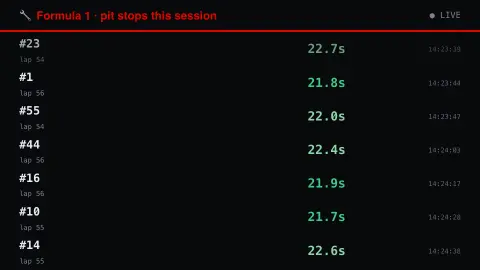
The F1 Pit Stops screensaver shows every pit stop in the current Formula 1 session with how long the car spent in the pit lane, from the key-less OpenF1 API. Fastest stops are highlighted. It's free, runs in your browser, and ESC exits.
Live preview
Press ESC to leave fullscreen. Settings are saved in your browser only.
How the F1 Pit Stops screensaver works
The saver reads the OpenF1 API directly in your browser — no key and no account.
Every pit stop in the current Formula 1 session with how long the car spent in the pit lane, from the key-less OpenF1 API.
It refreshes on a schedule, so what you see stays current.
Colours can be changed in settings; nothing is stored beyond your own browser.
What a pit-stop time really measures
The pit-stop figures come from OpenF1, an open-source API for Formula 1 timing, telemetry and session data. The project describes itself as independent and community-driven, and as not associated with Formula 1, the FIA or Formula One Management. For each stop its pit endpoint records the driver, the lap number, a timestamp and a duration in seconds.
That duration is the time spent in the pit lane. OpenF1 documents lane_duration as the time spent in the pit lane; the older pit_duration field is the same value, is marked deprecated and is due for removal at the end of the 2026 season. OpenF1 also offers a separate stop_duration, the stationary stop time, but only from the 2024 US Grand Prix onwards.
The distinction matters for reading the numbers. The short stationary time usually quoted for a tyre change is not the pit-lane time, which also includes driving through the lane. Lane time therefore depends on the length and layout of each circuit’s pit lane, so comparing durations between different race weekends is misleading; comparing stops within one session is fairer. A stop that includes a repair, a penalty or a wait behind another car will also show a longer lane time.
A worked example
Every pit stop in the current Formula 1 session with how long the car spent in the pit lane, from the key-less OpenF1 API. Fastest stops are highlighted.
Settings & tips
- Accent and Background recolour the display.
- Data comes straight from the OpenF1 API in your browser.
- Press ESC to leave fullscreen.
Frequently asked questions
- Is this real data?
- Yes — it comes from the OpenF1 API and is refreshed on a schedule.
- Is a key needed?
- No. This source is fully key-less.
- Is it free?
- Yes — free, no download, in your browser.
- Is this the time the car stands still?
- No. The figure is the time spent in the pit lane overall, which includes driving through the lane, so it is longer than the stationary part of the stop. OpenF1 publishes stationary time separately only from the 2024 US Grand Prix onwards.
- Why are times different at different circuits?
- Pit lanes differ in length and layout, and the time is measured over the whole lane, so the same crew can post longer lane times at some tracks than others.
- Is this official Formula 1 data?
- No. It comes from OpenF1, which describes itself as independent and not associated with Formula 1, the FIA or Formula One Management, so it can differ from official timing.