F1 Live Timing Screensaver
The F1 Live Timing screensaver shows running order for the current Formula 1 session from the key-less OpenF1 API, drawn in each team's colour. During a race weekend this is live; between weekends it shows the last session that ran, and says so. It's free, runs in your browser, and ESC exits.
Live preview
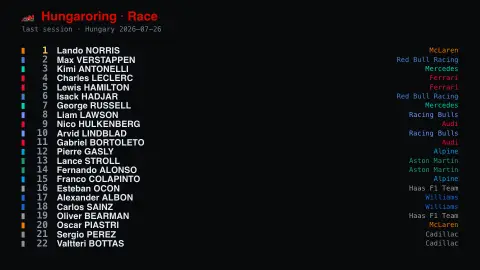
Press ESC to leave fullscreen. Settings are saved in your browser only.
How the F1 Live Timing screensaver works
The saver reads the OpenF1 API directly in your browser — no key and no account.
Running order for the current Formula 1 session from the key-less OpenF1 API, drawn in each team's colour.
It refreshes on a schedule, so what you see stays current.
Colours can be changed in settings; nothing is stored beyond your own browser.
How OpenF1 gets its timing
OpenF1 describes itself as an independent, community-driven, open-source project, and states that it is not associated with Formula 1, the FIA or Formula One Management. Its API serves data such as lap times and sector data, race positions, intervals and gaps, pit stops and tyre compounds, race control messages and weather. This saver draws the running order of whichever session the API reports as current.
The running order is how cars are ranked at that moment, not the final classification. Position data changes as cars pit: a driver who has just stopped can drop several places and then recover them as others make their own stops. Each driver is shown in team colours, which is the quickest way to match a car to its team.
OpenF1 treats a session as live from 30 minutes before it starts until 30 minutes after it ends, and anything outside that window as historical data. Between race weekends the board therefore reflects the most recent session and can look frozen. Because the project is unofficial, anything decided after the event, such as penalties, is settled only in the official results.
A worked example
Running order for the current Formula 1 session from the key-less OpenF1 API, drawn in each team's colour. During a race weekend this is live; between weekends it shows the last session that ran, and says so.
Settings & tips
- Accent and Background recolour the display.
- Data comes straight from the OpenF1 API in your browser.
- Press ESC to leave fullscreen.
Frequently asked questions
- Is this real data?
- Yes — it comes from the OpenF1 API and is refreshed on a schedule.
- Is this live right now?
- During a race weekend, yes. Between weekends OpenF1 serves the last session that ran, and the header says so rather than dressing up a finished race as live.
- Is a key needed?
- No. This source is fully key-less.
- Is it free?
- Yes — free, no download, in your browser.
- Why does the order shuffle during a race?
- Pit stops change positions temporarily, because a car that has stopped rejoins behind others that have not yet pitted, until they stop too.
- Is this an official Formula 1 service?
- No. OpenF1 says it is an independent, community-driven project not associated with Formula 1, the FIA or Formula One Management, so it should not be treated as an official timing feed.