End-of-Life Countdown Screensaver
The End-of-Life Countdown screensaver shows how long widely-run software has before it stops getting security support, from the key-less endoflife.date project, sorted soonest-first so what is about to expire is what you see. It's free, runs in your browser, and ESC exits.
Live preview
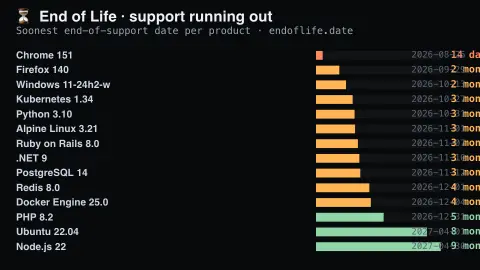
Press ESC to leave fullscreen. Settings are saved in your browser only.
How the End-of-Life Countdown screensaver works
The background pipeline reads this from endoflife.date and saves a snapshot the saver loads.
How long widely-run software has before it stops getting security support, from the key-less endoflife.date project, sorted soonest-first so what is about to expire is what you see..
It refreshes on a schedule, so what you see stays current.
Colours can be changed in settings; nothing is stored beyond your own browser.
What end of life means for software
Software projects publish support policies that say how long each version will receive fixes. When that window closes, a release reaches end of life: its developers stop issuing security patches, so any new vulnerability found in that version stays unfixed. The version still runs, but it becomes steadily more exposed, which is why operations and security teams keep calendars of the dates.
The endoflife.date project describes itself as documenting end-of-life dates and support lifecycles for a wide range of products, grouped into categories such as operating systems, databases, programming languages, frameworks, applications and devices. It aggregates data from various sources, publishes it through an API and iCalendar support, and accepts corrections from maintainers and contributors through its GitHub repository.
The countdown here depends on those published dates being accurate, and because the data is community-maintained, entries can be updated as projects revise their plans. A near date does not mean a product is dangerous today, only that planning an upgrade is due. Support windows also differ widely from one product to another, so the soonest-expiring items change often.
A worked example
How long widely-run software has before it stops getting security support, from the key-less endoflife.date project, sorted soonest-first so what is about to expire is what you see.
Settings & tips
- Accent and Background recolour the display.
- Run
automation/run.py endoflifeto refresh the feed. - Press ESC to leave fullscreen.
Frequently asked questions
- Is this real data?
- Yes — it comes from endoflife.date and is refreshed on a schedule.
- What does end-of-life mean here?
- The date a release stops receiving support, including security fixes. The soonest upcoming date for each product is shown, since that is the one that matters.
- Is a key needed?
- No. This source is fully key-less.
- Is it free?
- Yes — free, no download, in your browser.
- What happens when software passes its end-of-life date?
- It no longer receives security patches from the developer. It will usually keep running, but newly discovered flaws will not be fixed in that version.
- Where do the end-of-life dates come from?
- endoflife.date aggregates them from various sources and accepts updates from maintainers and contributors through GitHub, so they follow what projects publish.
- Can end-of-life dates change?
- Yes. Dates reflect what projects publish, and endoflife.date lets contributors update entries when plans change, so a date can move.