Linux Kernel Releases Screensaver
The Linux Kernel Releases screensaver shows the current mainline, stable and longterm Linux kernel versions straight from kernel.org's own key-less releases feed, with end-of-life branches marked. It's free, runs in your browser, and ESC exits.
Live preview
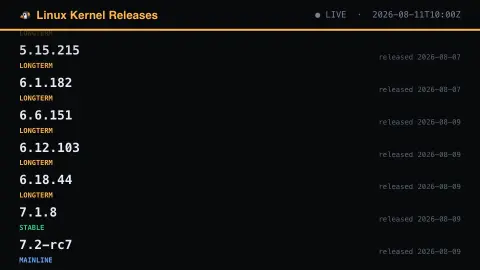
Press ESC to leave fullscreen. Settings are saved in your browser only.
How the Linux Kernel Releases screensaver works
The background pipeline reads this from kernel.org and saves a snapshot the saver loads.
The current mainline, stable and longterm Linux kernel versions straight from kernel.org's own key-less releases feed, with end-of-life branches marked..
It refreshes on a schedule, so what you see stays current.
Colours and the accent can be changed in settings; nothing is stored beyond your own browser.
How Linux kernel releases are organised
kernel.org publishes a machine-readable file, releases.json, listing the kernel branches it currently tracks. Each entry carries a version, a label called a moniker, a release date and an end-of-life flag. The monikers matter: mainline is Linus Torvalds’ tree, where new features land; stable kernels receive backported bug fixes after a mainline release; and longterm kernels are chosen for extended maintenance of important fixes.
Mainline follows a rhythm of a two-week merge window for new features, then a run of roughly weekly release candidates (-rc versions) that typically reaches somewhere between -rc6 and -rc9 before the final release. A new mainline kernel appears about every nine to ten weeks. The first number in a version changes only occasionally, when the second number is judged large enough, as when 5.0 followed 4.20, so it is not a signal of a big change.
End-of-life marks branches that no longer get fixes, and longterm branches carry projected end-of-life dates. Distributions ship their own kernels, which kernel.org does not host or support, so the kernel version on your machine can differ from what is listed as current.
A worked example
The current mainline, stable and longterm Linux kernel versions straight from kernel.org's own key-less releases feed, with end-of-life branches marked.
Settings & tips
- Accent and Background recolour the display.
- Run
automation/run.py kernelreleasesto refresh the feed. - Press ESC to leave fullscreen.
Frequently asked questions
- Is this real data?
- Yes — it comes from kernel.org and is refreshed on a schedule.
- Is a key needed?
- No. This source is fully key-less.
- Does it need an internet connection?
- Yes — it reads a live source, so it needs a connection to update.
- Is it free?
- Yes — free, no download, in your browser.
- What is the difference between stable and longterm?
- Each mainline kernel becomes stable once released, and receives backported fixes, usually only a few bugfix releases before the next mainline kernel arrives. Longterm kernels are chosen for extended maintenance of important fixes, with less frequent releases and projected end-of-life dates.
- What does -rc mean?
- It stands for release candidate. After the two-week merge window closes with -rc1, Linus Torvalds releases a new -rc roughly weekly while bugs are fixed, before the final version is tagged.
- Will my distribution show the same version?
- Often not. Distributions ship their own kernels, which kernel.org does not host or support, so the version on your system can differ from the numbers listed here.