Certificates For A Domain Screensaver
The Certificate Transparency screensaver lists certificates issued for a domain, newest first, from the public transparency logs. Every publicly trusted certificate authority must log every certificate it issues to these append-only logs, precisely so that a mis-issued certificate cannot stay secret. Point it at your own domain and it becomes a monitoring tool. It runs in the browser with nothing to install; press ESC to exit.
Live preview
Press ESC to leave fullscreen. Settings are saved in your browser only.
How the Certificates For A Domain screensaver works
The saver reads SSLMate's Cert Spotter API, which serves the public CT logs key-free.
No account and no key: the request goes straight from your browser, or from this site's own refreshed copy of the feed where the source does not allow browser access.
Values are drawn on a canvas that resizes with the window, so it works on a laptop or a wall display.
If the source is unreachable the saver says so on screen rather than showing stale numbers as though they were current.
Reading the certificate transparency logs
When a website uses HTTPS, its identity is vouched for by a certificate issued by a certificate authority. If an authority were tricked or compromised, it could issue a certificate for a domain to someone who does not control it. Certificate Transparency was designed to expose that kind of mistake: authorities submit the certificates they issue to public, append-only logs that anyone can read and audit. Browser policy, not a law, is what effectively requires this, since Chrome and Safari expect certificates to carry proof of logging.
SSLMate’s Cert Spotter service monitors those logs and lets you query them by domain. Each issuance it returns includes the dates the certificate is valid, and, when expanded, the DNS names it covers and details of the issuing authority. Seeing a certificate listed shows that it exists and was logged. That is different from saying the site is in use, safe or legitimate.
Domain owners use this to catch unauthorised or unexpected issuance, but ordinary activity produces plenty of entries too: renewals, certificates for subdomains, and certificates issued to hosting and content-delivery providers on a company’s behalf. A short list of entries is therefore usually routine, and the signal worth noticing is an authority or hostname you do not recognise.
A worked example
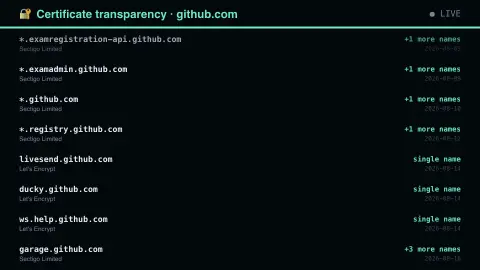
Each row shows the first hostname on the certificate, the issuing authority, how many additional names the certificate covers, and the date it became valid. A large site's wildcard certificate covers dozens of names at once. With ninety-day certificate lifetimes now the norm, a busy domain reissues constantly, and the dates make that rhythm visible.
Settings & tips
- Accent and Background recolour the display without changing the data.
- Add it to a Multi-view grid to watch it alongside other live savers.
- Press ESC at any time to leave fullscreen.
Frequently asked questions
- What is certificate transparency?
- A public, append-only log of every certificate issued by a trusted authority. It exists so that mis-issuance can be detected: if somebody obtains a certificate for your domain, it must appear in these logs, where anyone can see it.
- Can I watch my own domain?
- Yes. Change the domain setting and it queries the logs for that name and its subdomains. Seeing an issuance you did not request is exactly the signal the log system was built to provide.
- Is this real data?
- Yes. It comes from SSLMate's Cert Spotter API, which serves the public CT logs key-free. Nothing is invented or simulated, and if the source cannot be reached the saver reports that instead of drawing something plausible.
- Does it cost anything or need an account?
- No. Every screensaver here is free, runs in the browser and needs no sign-up. This one uses a public API that requires no key.
- Why are there so many certificates for one domain?
- Certificates are renewed regularly and each new one is a separate logged entry. Subdomains and hosting or content-delivery services add more.
- Does a certificate in the log mean something is wrong?
- No. Browser policy effectively requires certificates to be logged, so most entries are routine. An entry only becomes a concern if the domain owner did not expect it.
- Can the logs be edited afterwards?
- Logs are append-only and use Merkle trees, so anyone can verify that a log behaves correctly and that a certificate was legitimately added. Certificates cannot be deleted, changed or inserted after the fact.