Dev Service Status Board Screensaver
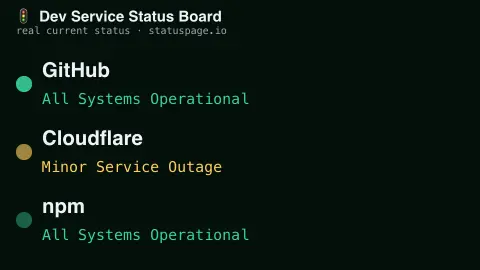
The Dev Service Status Board screensaver shows the real current operational status of major developer services as it's reported. It is free, runs in your browser, and ESC exits.
Live preview
Press ESC to leave fullscreen. Settings are saved in your browser only.
How the Dev Service Status Board screensaver works
The background pipeline polls each service's own Statuspage — the shared status-page format many companies use — every few minutes.
Each row shows one service's real current status, colour-coded, with a softly pulsing indicator dot.
A header shows the last update time.
No key is required for this key-less public endpoint.
Statuspage and the language of service status
Many software companies publish their operational status through Statuspage, a hosted product from Atlassian that lets a company choose components to show and post incident updates from investigation through resolution. Status pages expose a machine-readable API: the summary.json endpoint returns the overall indicator, component states, unresolved incidents and scheduled maintenances, while status.json returns only the page-wide indicator and description.
The indicator is one of none, minor, major or critical, with maintenance tracked separately. Because the same format is used across companies, one display can follow several unrelated providers at once. The company posting the page decides what to publish, and a status page generally reflects what the provider has declared, so it can lag what users actually experience while an engineer notices, confirms and posts a problem.
So a green row says that the provider has not declared a problem, not that every feature works for everyone. Partial outages affecting one region, one API route or one customer segment are possible, and a provider may choose not to post. Where there is a live incident, the provider's own page holds the authoritative timeline and updates.
A worked example
A real service's status appears with a colour-coded dot and its open incident count, refreshing automatically every few minutes.
Settings & tips
- Each row shows a real service's current status and open incident count.
- Accent recolours the header and highlights.
- Statuspage is a shared status-page format used by hundreds of companies.
Frequently asked questions
- Is this real data?
- Yes — it's read live from each service's own Statuspage, the shared status-page format many companies use.
- Is a key needed?
- No. This is a fully key-less public API.
- How often does it refresh?
- The pipeline polls for new records every few minutes.
- Is it free?
- Yes — free, no download, in your browser.
- Why might a service feel broken when it shows as operational?
- Status pages reflect what the provider has declared, usually after an incident is noticed and confirmed, and they may not cover every region or feature. Users can notice trouble before the page changes.
- Do different providers use the same severity scale?
- The indicator values (none, minor, major, critical) are shared by the Statuspage format, but each company decides when to apply them, so the same word can reflect different situations.
- What is a maintenance window?
- A scheduled period announced in advance when a provider expects reduced availability, tracked separately from unplanned incidents.