Commodities Screensaver
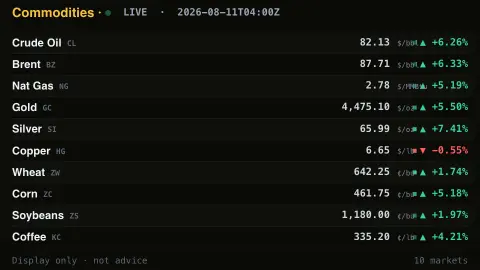
The Commodities screensaver is a live board of commodity prices — crude oil, natural gas, gold, copper, wheat and coffee — with their daily moves, gathered from public futures data by the pipeline. It's free, runs in your browser, display only, and ESC exits.
Live preview
Press ESC to leave fullscreen. Settings are saved in your browser only.
How the Commodities screensaver works
A background pipeline reads futures prices for the world's key commodities — energy, metals and agriculture — from public market data.
The saver lays them out as a board: each commodity with its price, unit and the day's move.
Risers are green with an up arrow, fallers red with a down arrow, each with a small flashing tick.
It refreshes on a schedule so the board tracks the market through the day.
What a futures quote actually represents
The figures on a commodity board are usually futures prices. A futures contract is an agreement to buy or sell a set quantity of a commodity at a fixed price on a future date, traded on an exchange such as CME Group or ICE. A quote headlined as the price of oil or gold is generally the price of the nearest or most actively traded contract, not a spot price paid for physical delivery today.
Each commodity has its own unit, which is why the board prints one beside the price. CME's WTI crude oil contract covers 1,000 barrels and is quoted in dollars per barrel, with physical delivery at Cushing, Oklahoma, which is why WTI is tied to the United States. Brent is a separate North Sea-based benchmark, also quoted per barrel. Henry Hub natural gas is quoted in dollars per MMBtu (million British thermal units), gold per troy ounce, and grains per bushel.
The daily move is measured against the previous close or settlement, depending on the data provider, so it can look odd around weekends, exchange holidays and contract roll dates, when the quote shifts from one expiry to the next. Futures data from free sources is often delayed and meant for display only. This is not trading data and nothing here is a forecast.
A worked example
The board reads down the commodities — Crude Oil $69.23 ▼ -5.4%, Gold $2,410 ▲ +0.8%, Wheat, Coffee — the green and red arrows shifting as the futures markets move.
Settings & tips
- Accent recolours the board headings.
- Background sets the board backdrop.
- Run
automation/run.py commoditieson your pipeline machine to refresh prices.
Frequently asked questions
- Are the prices real?
- Yes. They're public commodity-futures prices gathered by the pipeline, refreshed on a schedule.
- Is this investment advice?
- No. It's a display of public market data for ambiance, not advice of any kind.
- Why does it use a pipeline?
- The market source isn't readable directly from a browser, so a small background script fetches it and saves a snapshot.
- Which commodities are shown?
- Energy (oil, gas), metals (gold, silver, copper) and agriculture (wheat, corn, soybeans, coffee).
- Is it free?
- Yes — free, no download, in your browser.
- What is the difference between spot and futures prices?
- A spot price is for immediate delivery; a futures price is for delivery at a set later date. The two usually move together but can differ because of storage costs, interest and expectations.
- Why do commodities use different units?
- Each market grew up with its own trade convention, such as barrels for oil, MMBtu for natural gas, troy ounces for precious metals and bushels for grain. Prices are only comparable within the same unit.
- What is a contract roll?
- Futures expire, so data providers periodically switch from the expiring contract to the next one. The quoted price can step because the two contracts trade at different prices.