Market Heatmap Screensaver
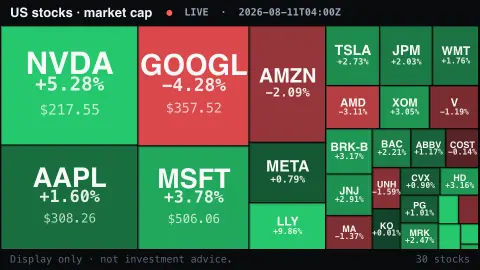
The Market Heatmap screensaver is a live treemap of major U.S. stocks sized by company value and shaded green-to-red by their daily move, gathered from public market data by the pipeline. It's free, runs in your browser, display only, and ESC exits.
Live preview
Press ESC to leave fullscreen. Settings are saved in your browser only.
How the Market Heatmap screensaver works
A background pipeline reads live prices for the largest U.S. companies and works out each one's market value.
The saver draws them as a treemap — each company a tile whose area reflects its size, the biggest names filling the most space.
Tiles glow green when the stock is up on the day and red when it's down, brighter the bigger the move.
The symbol and percentage change sit on each tile, and the colors ease as the market moves.
Understanding a stock-market treemap
Heatmaps of the stock market are popular because they compress hundreds of companies into one image. The usual layout is a treemap, a design invented by Ben Shneiderman in the early 1990s at the University of Maryland’s Human-Computer Interaction Lab, where a rectangle is divided into smaller rectangles whose areas are proportional to a value and which can nest to show hierarchical data. For stocks the value is market capitalisation, the share price multiplied by the number of shares outstanding.
That makes size a measure of how the market values a company in total, so a few giants fill much of the screen. Colour typically encodes the percentage change of the share price relative to the previous close. Because the same percentage move means a very different amount of money for a large company and a small one, a big tile can dominate the mood of the display even though its colour change looks modest.
Prices come from public quote sources and may be delayed, depending on the provider. The map says nothing about whether a company is cheap or expensive, nor about earnings, and a green screen on one day is a weak guide to the next. This is a display of the day’s movement, not a recommendation to buy or sell anything.
A worked example
Big tiles for AAPL, MSFT and NVDA anchor the board while smaller names pack the edges, the whole map flushing green on a rally or red on a sell-off — NVDA -4.8%, JPM +0.6% — at a glance.
Settings & tips
- Background sets the backdrop behind the tiles.
- Bigger tiles also show the company name and price.
- Run
automation/run.py heatmapon your pipeline machine to refresh the market.
Frequently asked questions
- Is the market data live?
- Yes. Prices and daily moves are gathered live by the pipeline, refreshed on a schedule.
- How is tile size decided?
- By each company's market value — bigger companies get bigger tiles, so the board is dominated by the mega-caps.
- Is this investment advice?
- No. It's a display of public market data for ambiance, not advice of any kind.
- Why does it use a pipeline?
- The market source isn't readable directly from a browser, so a background script fetches it and saves a snapshot.
- Is it free?
- Yes — free, no download, in your browser.
- What is market capitalisation?
- A company’s share price multiplied by the number of its shares outstanding, giving the total value the market places on the whole company at that moment.
- Who invented the treemap layout?
- Ben Shneiderman, who developed treemaps in the early 1990s at the University of Maryland’s Human-Computer Interaction Lab as a way of showing hierarchical data in limited space.
- Why can a small percentage move on a big tile matter more?
- A one percent change in a very large company represents far more money than the same change in a small one, so it can move an index even though it looks mild on screen.