Biggest Movers Screensaver
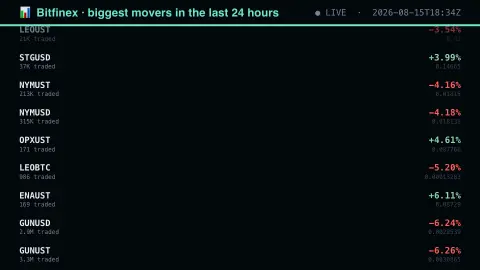
The Biggest Movers screensaver ranks Bitfinex's entire listed book by 24-hour change, showing the traded volume beside each move so a spike on an empty market is distinguishable from a real one. It runs in the browser with nothing to install; press ESC to exit.
Live preview
Press ESC to leave fullscreen. Settings are saved in your browser only.
How the Biggest Movers screensaver works
The saver reads The public Bitfinex v2 ticker, refreshed through this site's pipeline.
No account and no key: the request goes straight from your browser, or from this site's own refreshed copy of the feed where the source does not permit browser access.
Values are drawn on a canvas that resizes with the window, so it works on a laptop or a wall display.
If the source is unreachable the saver says so on screen rather than showing stale numbers as though they were current.
Bitfinex tickers and why volume qualifies a move
Bitfinex’s public v2 tickers endpoint returns one array per trading pair, with positions rather than named fields. For a pair such as tBTCUSD the order is symbol, bid, bid size, ask, ask size, change, relative change, last price, volume, high, low and (in the documentation’s listing) the timestamp of the first trade. That format is compact but means a reader has to know which index holds what; the relative change is a fraction, so it must be multiplied by 100 to read as a percentage.
A percentage tells you only about relative price, and it is very sensitive on thin markets. A token that trades a few hundred dollars a day can double on one small order, whereas a move of a few percent in a large pair takes heavy capital. That is why the display puts volume next to the change, and why spikes with tiny volume deserve scepticism.
The same asset can appear in several pairs against different quote currencies, each with its own price, volume and change. Prices are those of one exchange only and can differ from other venues. Nothing here predicts what happens next: the change is measured over a rolling window, so a pair can sit at the top and then drop away as the window slides.
A worked example
Each row gives the pair, its percentage move and the volume traded. Read them together: a forty per cent move on a few thousand dollars of volume is two people trading with each other, while a four per cent move on a deep book is the market actually repricing something.
Settings & tips
- Accent and Background recolour the display without changing the data.
- Add it to a Multi-view grid to watch it alongside other live savers.
- Press ESC at any time to leave fullscreen.
Frequently asked questions
- Why does volume matter more than the percentage?
- Because percentage change measures the last trade, and on an illiquid pair the last trade can be tiny. Volume tells you how much agreement there was behind the move.
- How is the change calculated?
- From the exchange's own daily change field, which the pipeline converts from a ratio to a percentage. Bitfinex reports it as 0.07 where it means seven per cent, and printing that raw would understate every move by a hundredfold.
- Is this real data?
- Yes. It comes from The public Bitfinex v2 ticker, refreshed through this site's pipeline. Nothing is invented or simulated, and if the source cannot be reached the saver reports that instead of drawing something plausible.
- Does it cost anything or need an account?
- No. Every screensaver here is free, runs in the browser and needs no sign-up. This one uses a public API that requires no key.
- Why is the ticker a list of numbers rather than named fields?
- Positional arrays keep each message small and quick to parse, which suits a feed that updates constantly. The Bitfinex documentation defines the order of the fields.
- Can a pair be listed against different currencies?
- Yes. A token can trade against more than one quote currency, and each pair has its own price, volume and change.