Unconfirmed Screensaver
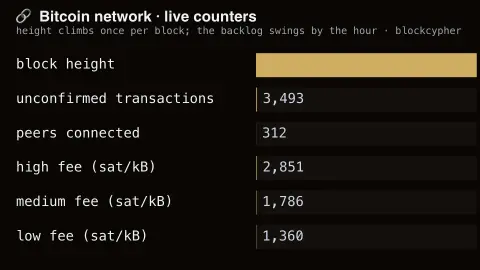
The Unconfirmed screensaver shows Bitcoin's operational counters side by side: block height, the number of unconfirmed transactions, peers connected and BlockCypher's high, medium and low fee estimates. It runs in the browser with nothing to install; press ESC to exit.
Live preview
Press ESC to leave fullscreen. Settings are saved in your browser only.
How the Unconfirmed screensaver works
The saver reads BlockCypher's public chain endpoint, key-free.
No account and no key: the request goes straight from your browser, or from this site's own refreshed copy of the feed where the source does not permit browser access.
Values are drawn on a canvas that resizes with the window, so it works on a laptop or a wall display.
If the source is unreachable the saver says so on screen rather than showing stale numbers as though they were current.
Unconfirmed transactions and what a block can hold
When someone sends bitcoin, the transaction is broadcast to the network and waits in a pool of unconfirmed transactions until a miner includes it in a block. BlockCypher is a web API that returns JSON for several blockchains, and its Bitcoin chain endpoint reports the current block height, the number of unconfirmed transactions waiting in the memory pool, and three fee estimates. The display shows the part of that data that moves most.
Height is the number of blocks in the chain, so it steps up by one each time a block is mined. The protocol targets an average of about ten minutes per block, but timing is random, so blocks can arrive in quick succession or after a long wait. The unconfirmed count is a balance between arrivals and the room in each block: it grows when demand outpaces block space and falls when a block is found and confirms a batch of waiting transactions.
The fee fields are rolling averages of the fee paid per kilobyte, in satoshis, for confirmation within about 1 to 2 blocks (high), 3 to 6 blocks (medium) and 7 or more blocks (low). Each node and each provider keeps its own pool of waiting transactions, so the unconfirmed count is one service’s view and others will report somewhat different figures. Peers are the other nodes a node is connected to, and BlockCypher’s own documentation says its peer count is not meaningful for now, so treat it as a curiosity. Nothing here relates to bitcoin’s price.
A worked example
Six labelled bars. Height climbs by one roughly every ten minutes and never falls. The unconfirmed count is the volatile one, swinging by thousands within an hour as fee pressure builds and a block clears it. The three fee tiers beneath show the spread between paying for speed and paying for patience.
Settings & tips
- Accent and Background recolour the display without changing the data.
- Add it to a Multi-view grid to watch it alongside other live savers.
- Press ESC at any time to leave fullscreen.
Frequently asked questions
- Why does the backlog change so fast?
- Because it is a queue with bursty arrivals and lumpy service. Transactions arrive continuously but are only cleared when a block is found, so the count sawtooths — building for ten minutes, dropping sharply, building again.
- What are peers?
- Other nodes this provider's node is connected to. Bitcoin has no central server; every node gossips transactions and blocks to its peers, and the count is a rough measure of how well connected the network is.
- Is this real data?
- Yes. It comes from BlockCypher's public chain endpoint, key-free. Nothing is invented or simulated, and if the source cannot be reached the saver reports that instead of drawing something plausible.
- Does it cost anything or need an account?
- No. Every screensaver here is free, runs in the browser and needs no sign-up. This one uses a public API that requires no key.
- Why does the unconfirmed count drop suddenly?
- A newly mined block confirms a batch of waiting transactions at once, so the pending number falls in a single step.
- What do the high, medium and low fee figures mean?
- BlockCypher describes them as rolling averages of the fee paid per kilobyte, in satoshis, by transactions confirmed within about 1 to 2 blocks, 3 to 6 blocks and 7 or more blocks respectively.
- What is a peer?
- It is another node connected directly to the one reporting, with which it exchanges blocks and transactions.