Antivirus Scan Screensaver
The Antivirus Scan screensaver shows a convincing fake antivirus scanning screen with a scrolling file list and a progress bar that never quite finishes. It is free, runs in your browser, and ESC exits.
Live preview
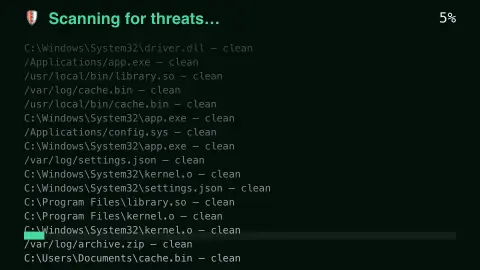
Press ESC to leave fullscreen. Settings are saved in your browser only.
How the Antivirus Scan screensaver works
The saver renders a familiar full-screen "scanning for threats" layout with a scrolling list of fake file paths.
A progress percentage creeps forward but is deliberately designed to never complete, for a convincing but harmless effect.
Nothing is scanned, installed, or changed on your real system — it is purely a visual screensaver.
Press any key or move the mouse to exit, like any other screensaver.
Why fake scan screens look so familiar
Antivirus scanner interfaces settled into a shape that people still recognise: a scrolling list of files being checked, a progress bar, a running count of items and a line for threats found. That familiar layout is what this page imitates. Scanners show file paths because real scans work through files on a drive, checking them for signs of malware.
The visual vocabulary has a darker side. Scareware is malware that uses social engineering to provoke shock, anxiety or a sense of threat so users will buy unwanted software. It often convinces users that their computer has a virus, then pushes them to pay for fake antivirus software to remove it; the infection is usually fictional. Some pop-ups are designed to resemble operating system alerts even though they are just web pages. The screensaver here is the harmless cousin of those pages and does not claim to find anything.
If you ever meet a real-looking scan in a browser, close the tab or quit the browser rather than clicking inside it. A real scan runs from software you installed yourself, in its own window.
A worked example
Left running on a shared screen, it reads exactly like a real ongoing system scan — good for a harmless prank or a familiar background aesthetic.
Settings & tips
- Accent recolours the progress bar.
- Nothing real is being scanned — it is a visual effect only.
- Great for a lighthearted office prank.
Frequently asked questions
- Does this actually scan my files?
- No — it is a purely visual screensaver effect. Nothing on your system is scanned.
- Will the scan ever finish?
- By design, no — it loops convincingly forever.
- Is a key needed?
- No — it runs entirely locally with no network requests.
- Is it free?
- Yes — free, no download, in your browser.
- Can a website really scan my computer?
- No. Browsers deliberately stop web pages from reading your files, so a page can only imitate a scan. A browser page claiming to have found viruses on your computer should not be trusted.
- What is scareware?
- Malware that uses social engineering to provoke shock, anxiety or a sense of threat, so people buy unwanted software. A common form is a fake warning that your computer has a virus.