Airport Forecasts Screensaver
The Airport Forecasts screensaver shows terminal aerodrome forecasts for major world airports, gathered key-less by the pipeline. A TAF is what the weather is expected to do; the site's METAR saver shows what it is doing now. It's free, runs in your browser, and ESC exits.
Live preview
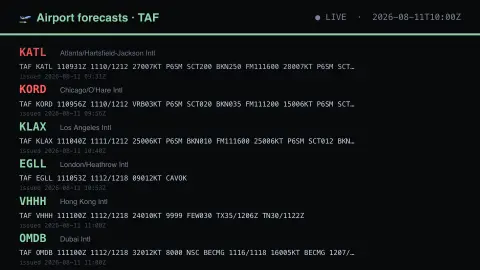
Press ESC to leave fullscreen. Settings are saved in your browser only.
How the Airport Forecasts screensaver works
The background pipeline reads this from the NOAA Aviation Weather Center and saves a snapshot the saver loads.
Terminal aerodrome forecasts for major world airports, gathered key-less by the pipeline.
It refreshes on a schedule, so what you see stays current.
Colours can be changed in settings; nothing is stored beyond your own browser.
How to read a TAF
TAF stands for Terminal Aerodrome Forecast, a compact coded forecast for an airport and its immediate surroundings. In the United States they are issued by National Weather Service Weather Forecast Offices; most cover 24 hours, and some major airports get 30 hours. The NOAA Aviation Weather Center distributes terminal forecasts with worldwide coverage, each airport identified by a four-letter ICAO code such as KORD for Chicago O’Hare.
A TAF packs wind direction and speed in knots, visibility, significant weather and cloud layers into a standard form. Cloud entries such as BKN or OVC give coverage and height in hundreds of feet. Change groups show how conditions are expected to evolve: FM begins a new set of conditions at a given time, TEMPO flags temporary fluctuations, and PROB30 marks a thirty percent chance of the stated conditions.
It is a forecast, so it can be amended and is sometimes wrong, particularly for the timing of fog, showers and thunderstorms. The display is a snapshot taken by the pipeline, so it can lag the latest issued version. It is not for operational flight planning.
A worked example
Terminal aerodrome forecasts for major world airports, gathered key-less by the pipeline. A TAF is what the weather is expected to do; the site's METAR saver shows what it is doing now.
Settings & tips
- Accent and Background recolour the display.
- Run
automation/run.py tafto refresh the feed. - Press ESC to leave fullscreen.
Frequently asked questions
- Is this real data?
- Yes — it comes from the NOAA Aviation Weather Center and is refreshed on a schedule.
- Is a key needed?
- No. This source is fully key-less.
- Is it free?
- Yes — free, no download, in your browser.
- What is the difference between a TAF and a METAR?
- A METAR is an observation of the weather at an airport, while a TAF forecasts how conditions are expected to change over the coming day or so.
- How accurate are TAFs?
- Useful for broad patterns, but the exact timing of fog, thunderstorms and wind shifts is hard to predict, which is why forecasts get amended.
- Can I use this for flight planning?
- No. The display is a delayed snapshot for viewing, and pilots must use official briefings from authorised sources.