Wikimedia Edit Firehose Screensaver
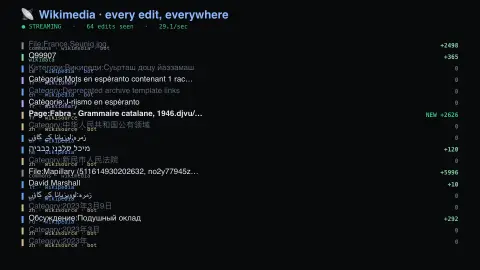
The Wikimedia Edit Firehose screensaver shows every edit across every Wikimedia project as it occurs, over the key-less EventStreams endpoint. A real streaming connection rather than a polled feed — hundreds of wikis at once, where the site's other wiki savers each watch one. It's free, runs in your browser, and ESC exits.
Live preview
Press ESC to leave fullscreen. Settings are saved in your browser only.
How the Wikimedia Edit Firehose screensaver works
The saver reads Wikimedia EventStreams directly in your browser — no key and no account.
Every edit across every Wikimedia project as it occurs, over the key-less EventStreams endpoint.
It refreshes on a schedule, so what you see stays current.
Colours can be changed in settings; nothing is stored beyond your own browser.
What flows through Wikimedia EventStreams
EventStreams is a public web service from Wikimedia that exposes continuous streams of structured event data over HTTP, using chunked transfer encoding and the Server-Sent Events protocol. It is backed internally by Apache Kafka and replaced the older RCStream service. The main stream, recentchange, carries MediaWiki recent-changes events, and other streams such as revision-create and page-create can be combined with it.
Each event is a small JSON record describing a change to a page on one wiki, including details such as the page title, the wiki, the editing user and flags for bot and minor edits. Not everything in the stream is a human-written paragraph: automated accounts make many edits, so a rapid run of changes on one project can point to a script, not a crowd.
The stream describes what was changed, not whether the change was good, and edits can be reverted later. It is a live feed and not an archive. The server closes connections after about 15 minutes, so clients reconnect and can resume with the Last-Event-ID header, with replay history limited to days. The service is meant for small-scale external tools.
A worked example
Every edit across every Wikimedia project as it occurs, over the key-less EventStreams endpoint. A real streaming connection rather than a polled feed — hundreds of wikis at once, where the site's other wiki savers each watch one.
Settings & tips
- Accent and Background recolour the display.
- Data comes straight from Wikimedia EventStreams in your browser.
- Press ESC to leave fullscreen.
Frequently asked questions
- Is this real data?
- Yes — it comes from Wikimedia EventStreams and is refreshed on a schedule.
- How is this different from the other wiki savers?
- Those poll one project's recent-changes list. This holds an open streaming connection to every Wikimedia project at once, so edits appear as they happen rather than in batches.
- Is a key needed?
- No. This source is fully key-less.
- Is it free?
- Yes — free, no download, in your browser.
- What protocol does EventStreams use?
- Server-Sent Events over an ordinary HTTP connection. Clients can also request newline-delimited JSON by sending an Accept: application/json header.
- What happens if the connection drops?
- The server closes connections after about 15 minutes, and clients reconnect. Sending the last event ID lets a client resume where it left off, within a limited history window.
- Are edits labelled as bots?
- Events carry a bot flag, but a flag only reflects how an account is marked, so some automated tools may not be labelled.