Terrain Flythrough Screensaver
The Terrain Flythrough screensaver generates an endless landscape from fractal noise and flies over it continuously, with fog closing off the far distance. It runs in the browser with nothing to install; press ESC to exit.
Live preview
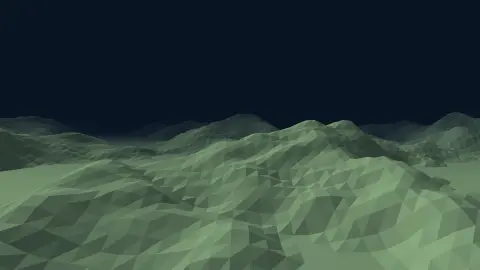
Press ESC to leave fullscreen. Settings are saved in your browser only.
How the Terrain Flythrough screensaver works
The saver renders with three.js on your GPU. The library is vendored into this site rather than fetched from a CDN, and loads only when a 3D screensaver actually runs.
It reads nothing external — the heightfield is generated in the browser.
The scene resizes with the window and releases its WebGL context when the saver stops, so shuffle mode and Multi-view can cycle 3D savers without exhausting the browser's context limit.
If WebGL is unavailable the saver says so on screen rather than showing an empty black box.
Octaves of noise and the geometry of fractal landscapes
Natural terrain shows statistical self-similarity: zoom in on a mountainside and the roughness resembles the shape of the whole range. Benoit Mandelbrot popularised this view in his work on fractals, and fractional Brownian motion, introduced by Mandelbrot and van Ness in 1968, is the classic self-similar random process. Its Hurst parameter, between 0 and 1, sets how rough the result is. Computer graphics borrowed the idea to fake landscapes cheaply.
The usual practical approximation sums layers of noise called octaves. The first octave gives broad hills. In the common setup each further octave doubles the frequency, so features are half as large (a multiplier called lacunarity), and its amplitude is scaled by a persistence factor below one, often 0.5, so the finer detail is weaker. More octaves make the surface rougher, with diminishing returns once detail is smaller than a pixel.
Distance fog in a flythrough serves two purposes. It helps the eye read depth, as real air scatters light, and it hides the edge of the generated area so the world seems endless. A pure height-noise landscape lacks erosion, rivers and strata, which is why it feels like generic terrain, not a specific geography.
A worked example
Height comes from four octaves of noise summed together: the low frequencies give the large landforms and the high ones add ridges and gullies, which is the standard way to get terrain that looks eroded without simulating erosion. Only the vertex heights are rewritten as the ground scrolls, so nothing is allocated per frame, and the low ground is clamped flat to read as water.
Settings & tips
- Accent and Background recolour the scene; Speed changes the pace of the motion and the camera.
- Add it to a Multi-view grid, though 3D savers are heavier than 2D ones and a few per screen is plenty.
- Press ESC at any time to leave fullscreen.
Frequently asked questions
- Does it ever repeat?
- Not on any timescale you would watch it for. The noise is evaluated at a continuously advancing coordinate rather than sampled from a tile, so the ground ahead has not been generated before.
- Why does distant terrain fade out?
- Fog, and it is doing real work. Without it the mesh would end at a hard edge revealing that the world is a finite sheet. Fading the far end both hides that and gives the scene depth.
- Does this need a special browser or plugin?
- No. It uses WebGL, which every current desktop and mobile browser supports. Nothing is installed and no plugin is required.
- Does it cost anything or need an account?
- No. Every screensaver here is free, runs in the browser and needs no sign-up.
- What does persistence mean in terrain noise?
- It is the factor by which each successive octave's amplitude shrinks. Lower values give smooth rolling land, higher values keep the fine detail strong and make the ground rougher.
- Why does adding octaves stop helping at some point?
- Each layer is finer than the last, and beyond a few levels the detail becomes smaller than what the screen can display, so extra layers cost computation without visible gain.
- Is this what real mountains look like?
- Only roughly. Real ranges are shaped by erosion and rock type, producing valleys and drainage patterns that simple noise does not capture.