Steam Player Count Race Screensaver
The Steam Player Count Race screensaver turns Steam's most-played games into an animated bar race: widths ease toward real concurrent-player counts and rows glide up or down on overtakes. It reads the same pipeline feed as the Steam Top Games board, refreshed about every 30 minutes. It's free, needs an internet connection, and ESC exits.
Live preview
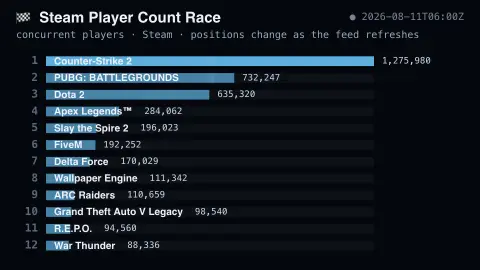
Press ESC to leave fullscreen. Settings are saved in your browser only.
How the Steam Player Count Race screensaver works
The background pipeline gathers concurrent-player counts from Valve's public Steam charts into content/steamtop.json.
Each game keeps a lane; when a refresh changes the order, lanes ease smoothly to their new positions instead of snapping.
▲/▼ arrows mark real rank changes since the previous refresh — nothing is simulated between updates.
New entries slide in from the bottom of the screen, and games that fall off the list glide out.
Concurrent players on Steam and what they mean
Steam is Valve’s PC games storefront and platform, and its Most Played chart ranks the top 100 games by current players, with a peak-today figure beside each. The measure is concurrent players: people with the game running at that moment, not owners or monthly players. SteamDB describes it as anyone who has the game running through Steam, whether in a match, at a menu or idling, so a count can include players who are not actively playing.
Because the ranking is by concurrency, games with large ongoing online communities can hold high counts, while a game that people finish and put down can rank lower than its ownership would suggest. Steam’s audience is spread across time zones, so counts move through the day, and a snapshot taken at one hour can order close games differently from one taken a few hours later.
Two limits apply. The chart covers only the top 100, so a game missing from it can still have active players, and it covers Steam only, not games played through other stores or a publisher’s own launcher. Valve’s chart page does not define its columns in detail, so treat each bar as a moment’s snapshot of Steam, not of the whole PC market.
A worked example
When PUBG's player count climbs past Dota 2 between refreshes, the two bars trade places in one smooth overtake, a green ▲1 appears, and the counts ease to their new values. It's the same data as the Steam Top Games board, staged as a race. In Multi-view you can run both side by side.
Settings & tips
- Games shown sets how many lanes race (5–15).
- Positions genuinely change only when the pipeline feed refreshes, about every 30 minutes — the animation is the transition, not fake data.
- Run
automation/run.py steamtopon your pipeline machine to refresh the data.
Frequently asked questions
- Are the player counts real?
- Yes — real concurrent-player counts from Valve's public Steam charts, gathered by the site's pipeline. The saver never invents movement between refreshes.
- Do I need an API key?
- No. The pipeline reads Valve's key-less public data; the saver just reads a local JSON feed.
- Does it work offline?
- It needs a connection to read the feed; once loaded it keeps animating the last real standings.
- Is it free?
- Yes — free, no download, in your browser.
- How is this different from Steam Top Games?
- Same real feed, different display: Top Games is a calm ranked board, while the Race animates overtakes, entrances and exits so rank changes are the star.
- Does this show how many people own each game?
- No. The bars show players connected at the time of the snapshot, so a widely owned game that few people are running at that moment will show a small bar.
- Why do ranks change during the day?
- Players are spread across time zones and each game has its own audience, so peaks occur at different hours. A game popular in one region can climb while another falls.