Snap Store Screensaver
The Snap Store screensaver shows what Ubuntu's Snap Store surfaces first across a rotating set of categories, gathered key-less by the pipeline. It's free, runs in your browser, and ESC exits.
Live preview
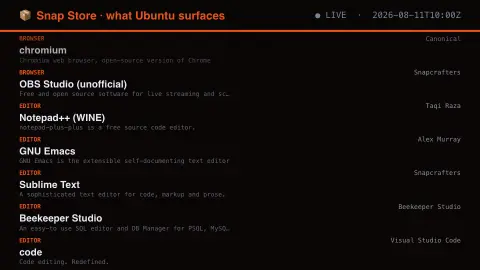
Press ESC to leave fullscreen. Settings are saved in your browser only.
How the Snap Store screensaver works
The saver reads the source described above and draws it on a canvas — no account, no tracking.
What Ubuntu's Snap Store surfaces first across a rotating set of categories, gathered key-less by the pipeline. Snapcraft publishes no recently-updated endpoint, so this is honestly a ranked search rather than a release stream — its own answer to what people install.
It refreshes on a schedule, so what you see stays current.
Colours and any options can be changed in settings; nothing is stored beyond your own browser.
How the Snap Store works
Snap is a packaging format created by Canonical, the company behind Ubuntu. A snap bundles an application with its dependencies and runs confined from the rest of the system, so one package can serve many Linux distributions. The Snap Store is the catalogue where snaps are published and discovered.
Developers release a snap to channels. Each channel has a risk level: stable, candidate, beta or edge. Stable is the default for installs, candidate is meant for builds almost ready for stable, and beta and edge carry progressively more risk of breaking changes. Each snap entry carries a name, title, summary, publisher and category.
Publishers can be the software’s own vendors or other parties who package it, and the store shows a verified mark for accounts that have passed a review of the publisher by Snap Store policy reviewers. What you see is the store’s own search ordering for a rotating set of categories, so it reflects store ranking, not download totals or release recency.
A worked example
What Ubuntu's Snap Store surfaces first across a rotating set of categories, gathered key-less by the pipeline. Snapcraft publishes no recently-updated endpoint, so this is honestly a ranked search rather than a release stream — its own answer to what people install.
Settings & tips
- Accent and Background recolour the display.
- Every value on screen comes from the live source — nothing is simulated.
- Press ESC to leave fullscreen.
Frequently asked questions
- Is this real data?
- Yes — it comes from the source named on this page and is refreshed on a schedule.
- Is a key needed?
- No. This source is fully key-less.
- Is it free?
- Yes — free, no download, in your browser.
- What is a snap channel?
- A channel is a release stream with a risk level: stable, candidate, beta or edge. Stable is the default, and the others let users follow newer, less tested builds.
- Can a snap be published by someone other than the app’s authors?
- Yes. Anyone with a store account can publish a snap, which is why the publisher name matters. Accounts that pass the store’s review process get a verified mark.