Radio Dial Screensaver
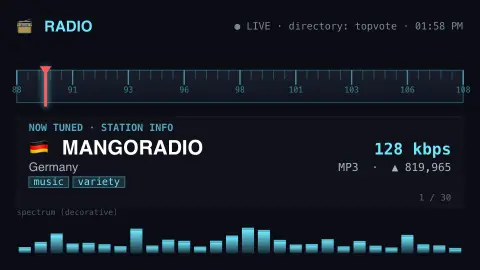
The Radio Dial screensaver is a retro receiver that tunes through the world's most-loved internet radio stations, showing each one's name, country, genre and bitrate with an animated spectrum, from the open Radio-Browser directory. It's free, runs in your browser, and ESC exits.
Live preview
Press ESC to leave fullscreen. Settings are saved in your browser only.
How the Radio Dial screensaver works
The saver queries the community Radio-Browser directory for the top stations — most-voted, most-tuned-in, or trending — with no key required.
A horizontal frequency dial slides its needle to each station in turn, showing the station name, its country flag, genre tags and bitrate.
An animated spectrum analyser bounces along for atmosphere; it's decorative, since the saver shows station info rather than playing audio.
It advances to the next station every few seconds and refreshes the directory periodically.
Radio-Browser and the open station directory
Radio-Browser is a community station index that is free and open source, with a public API at api.radio-browser.info. It is run by an individual maintainer and has been online since December 2015, with no guarantee of uptime. Anyone can also install the software and mirror all of its data. Clients find the available servers by a DNS lookup of all.api.radio-browser.info and are told to pick among them at random, retrying the next if one fails.
Each station record carries a name, country, tags and stream address, along with technical details recorded at the last check, such as codec and bitrate. Bitrate is the amount of audio data per second, usually in kilobits per second, and a higher number generally means better sound for a given codec, though newer codecs can match older ones at lower rates. Tags are free text, so a genre label is a rough guide, not a classification.
Popularity figures come from simple counters. A station's vote count only ever increases, and one IP address can vote for a given station once every 10 minutes. The click count covers the last 24 hours. These measure activity in the directory, not national audience measurement. The stream itself is hosted by each broadcaster, so a station can go offline independently of the directory.
A worked example
The needle sweeps the dial and lands on stations like 🇭🇺 Dance Wave! · electronic · 128k or 🇩🇪 MangoRadio · variety, the spectrum bars dancing beneath. Switch the list to “trending now” to follow whatever the world is tuning into.
Settings & tips
- Stations chooses top-voted, most-tuned-in, or trending stations.
- Seconds per station sets how long each station stays tuned.
- Dial color recolours the receiver.
Frequently asked questions
- Does it play audio?
- No. It's a visual dial that displays live station directory info — names, countries, genres and bitrates — rather than streaming sound.
- Where does the station list come from?
- The community-run Radio-Browser directory, a free and key-less index of internet radio stations worldwide.
- Is the spectrum real?
- No — the bouncing bars are decorative, since the saver isn't reading any audio. Everything else (station name, country, bitrate) is real live data.
- Does it need a key?
- No. Radio-Browser is free and key-less; the saver only needs an internet connection.
- Is it free?
- Yes — free, no download, in your browser.
- What does bitrate mean for a radio stream?
- It is the data rate of the audio, normally in kilobits per second. Higher rates usually mean better quality for the same codec, at the cost of more bandwidth.
- How does a station get its votes?
- Listeners vote through the directory, and each vote adds one to the station's count. A single IP address can vote for the same station only once every 10 minutes, and the count never goes down.
- Do the votes reflect real audience size?
- No. They reflect activity among users of the directory and apps built on it, which is a small and self-selected group compared with national radio ratings.