Prayer Times Screensaver
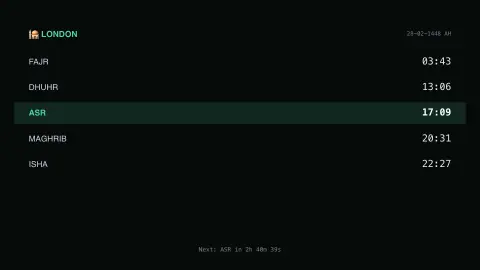
The Prayer Times screensaver shows the five daily Islamic prayer times for a city you choose, read live from the key-less Aladhan API, with the next prayer highlighted and counting down. It's free, runs in your browser, and ESC exits.
Live preview
Press ESC to leave fullscreen. Settings are saved in your browser only.
How the Prayer Times screensaver works
Pick a city and the saver asks the key-less Aladhan API for today's prayer times there.
Fajr, Dhuhr, Asr, Maghrib and Isha are listed in order, with the next one highlighted.
A live countdown shows how long remains until that next prayer.
Times refresh hourly, and you can switch the calculation method to match your local convention.
How prayer times are calculated
The five daily Islamic prayers are tied to the Sun’s position. Fajr starts at dawn, Dhuhr when the Sun passes its highest point, Asr in the afternoon, Maghrib at sunset and Isha once the evening twilight has faded. Because they depend on the Sun’s path, the times change every day and with the observer’s latitude and longitude, and they are hard to define in places where twilight lasts all night in summer.
The main differences between calculation methods are the angles used for dawn and nightfall. Most methods define Fajr and Isha as the moment the Sun is a set number of degrees below the horizon, and they do not agree: Aladhan’s list gives 18° and 17° for the Muslim World League, 15° and 15° for ISNA, and 19.5° and 17.5° for the Egyptian General Authority of Survey. Umm al-Qura University in Makkah uses 18.5° for Fajr but sets Isha at a fixed 90 minutes after Maghrib. Asr also depends on a choice between two schools: the shadow length of an object equalling its height (the standard setting) or twice its height (Hanafi).
Aladhan is a public service that implements these methods, producing times from coordinates. The result is a calculation, not an announcement; a local mosque or religious authority sets the times used in the community. At high latitudes, where the standard Fajr and Isha formulas can fail, extra rules such as splitting the night in half, using one seventh of the night, or an angle-based share of the night are applied.
A worked example
Pick Istanbul and the board fills with today's real times there — Maghrib highlighted as the next prayer, counting down minute by minute until it passes and Isha takes over.
Settings & tips
- City switches which city's times are shown.
- Calculation method matches the convention used by your local mosque or authority.
- The highlighted row is always the next prayer due.
Frequently asked questions
- Are these real prayer times?
- Yes — they're calculated live by the Aladhan API for the city you choose, using the calculation method you select.
- Is a key needed?
- No. The Aladhan API is fully key-less.
- Which prayers are shown?
- The five obligatory prayers: Fajr, Dhuhr, Asr, Maghrib and Isha. Sunrise and other landmarks are timing markers rather than prayers, so they're left off.
- Can I change the calculation method?
- Yes — ISNA, Karachi, Muslim World League, Umm al-Qura and the Egyptian General Authority are all available.
- Is it free?
- Yes — free, no download, in your browser.
- Why do calculation methods give different times?
- They use different Sun angles for dawn and nightfall, and some set Isha as a fixed interval after sunset instead of an angle. The Asr prayer also differs between the standard and Hanafi shadow-length conventions.
- Do prayer times change throughout the year?
- Yes, because sunrise and sunset move with the seasons. The change is larger the farther you are from the equator.
- What happens at very high latitudes?
- In the far north or south the Sun may not sink far enough below the horizon for Fajr and Isha to be defined in summer. High-latitude rules then divide the night, for example into halves or sevenths, or use an angle-based fraction.