Periodic Table Screensaver
The Periodic Table screensaver is a free, in-browser display of the full periodic table of the elements, color-coded by category, with a moving highlight that tours each element and names it. As it lands on an element it shows the symbol, atomic number, atomic mass, group, period, block and physical state. It runs instantly with no download. Press ESC to exit.
Live preview
Press ESC to leave fullscreen. Settings are saved in your browser only.
How the Periodic Table screensaver works
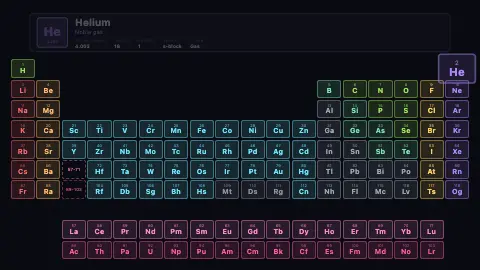
The saver lays out all 118 elements on an 18-column, 10-row CSS grid that matches the real periodic table. Each element's grid position is computed from its atomic number, including the offset rows that hold the lanthanides (57–71) and actinides (89–103) below the main body, with dashed placeholders left in the main table to point to them.
Every cell is tinted by its category — alkali metals, alkaline earths, transition metals, post-transition metals, metalloids, reactive nonmetals, halogens, noble gases, lanthanides and actinides each get a distinct color. The Background color sits behind the whole grid, and the Accent color is available for highlighting.
A timer steps through the elements one at a time, advancing every 800 milliseconds. The currently featured cell scales up and gets a colored glow, while the previously featured cell resets. A large detail panel above the grid animates in with the element's symbol, atomic number and atomic mass pulled from a built-in mass table.
That detail panel also computes and labels the element's group, period, block (s, p, d or f) and physical state at room temperature, using small lookup functions and tables for the eleven gases and two liquids. Once the tour reaches element 118 it loops back to hydrogen and starts again.
Mendeleev's table and how the grid is arranged
The periodic table arranges the chemical elements by atomic number. Dmitri Mendeleev’s 1869 table had gaps, and in 1871 he predicted four missing elements, among them eka-aluminium and eka-silicon. Gallium (1875) and germanium (1886) were later found with properties close to those predictions. Atomic number as the ordering principle was put on an experimental footing by Henry Moseley’s 1913 X-ray work, which explained why a few pairs, such as cobalt and nickel, sit out of order by atomic weight.
Rows are periods and columns are groups; IUPAC has recommended numbering the groups 1 to 18 since 1988. The s, p, d and f blocks span 2, 6, 10 and 14 columns, which is why the main body has gaps and the f-block is shown as two detached rows. These are the lanthanoids (La to Lu) and actinoids (Ac to Lr), pulled out so the table is 18 columns wide instead of 32. IUPAC has a project looking at whether group 3 should hold Sc, Y, Lu and Lr or Sc, Y, La and Ac.
Atomic masses come from IUPAC’s standard atomic weights. For elements without a characteristic natural isotopic abundance, the table lists the mass number of the nuclide with the longest confirmed half-life in square brackets. IUPAC validated and named elements 113, 115, 117 and 118 in 2016, completing the seventh row.
A worked example
With the defaults — Accent: cyan and a near-black Background — all 118 elements appear in their true grid positions, each tinted by category (halogens gold, noble gases violet, transition metals cyan, and so on). The highlight begins at Hydrogen, scales that cell up with a glow, and shows a panel reading H, atomic number 1, mass 1.008, group 1, period 1, s-block, Gas. Every 800 ms it advances — H, He, Li — and loops back to Hydrogen after Oganesson.
Settings & tips
- Set the Accent color to match your wallpaper or brand — it tints the highlight styling as the tour moves across the table.
- Pick a darker Background to make the category colors pop, or a lighter one for a softer classroom look.
- Leave it running as an ambient study aid — the 800 ms tour names and details every element in turn without any interaction needed.
Frequently asked questions
- Is the Periodic Table screensaver free?
- Yes. It is free and runs in your browser with no download or sign-up. Open the page and the tour of all 118 elements begins automatically.
- Does it show all 118 elements?
- Yes. Every element from Hydrogen to Oganesson appears in its correct grid position, including the lanthanides and actinides, each color-coded by category.
- How do I exit the Periodic Table screensaver?
- Press the ESC key to exit at any time. Moving the mouse or pressing any key also returns you to the controls.
- What information does it show for each element?
- For the highlighted element it shows the symbol, atomic number, atomic mass, category, group, period, block and physical state at room temperature.
- Can I use it to study chemistry?
- Yes. It works as a calm study aid, naming and detailing each element on an 800-millisecond tour so you can passively review the whole table.
- Why does the table have that odd shape?
- The shape follows the way electrons fill shells and subshells: the s, p, d and f blocks span 2, 6, 10 and 14 columns. That is why the main body has gaps and the f-block is shown as two detached rows.
- Why are the lanthanides and actinides shown separately?
- Placing them in the main body would make the table 32 columns wide instead of 18. They are drawn in two rows below purely for layout and belong in periods six and seven.