Trending On Mastodon Screensaver
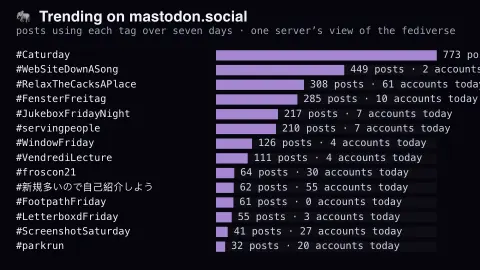
The Trending On Mastodon screensaver ranks hashtags trending on mastodon.social by how much they have been used over seven days. Mastodon requires a tag to be used by many distinct accounts before it will promote it — specifically to make brigading harder — so what appears here has genuine spread. It runs in the browser with nothing to install; press ESC to exit.
Live preview
Press ESC to leave fullscreen. Settings are saved in your browser only.
How the Trending On Mastodon screensaver works
The saver reads The public trends endpoint of mastodon.social, refreshed through this site's pipeline.
No account and no key: the request goes straight from your browser, or from this site's own refreshed copy of the feed where the source does not allow browser access.
Values are drawn on a canvas that resizes with the window, so it works on a laptop or a wall display.
If the source is unreachable the saver says so on screen rather than showing stale numbers as though they were current.
Trending hashtags on a Mastodon server
Mastodon is a federated social network: thousands of independent servers, called instances, each host their own users and exchange posts with one another. mastodon.social is operated by Mastodon GmbH, the company behind the Mastodon software. Each instance computes its own trending lists and exposes a public endpoint, /api/v1/trends/tags, that returns the hashtags being used more frequently over the past week.
What counts as trending is a rate of use, not a total: Mastodon's own description is a hashtag used more than usual and above a small minimum. The records are ordered by an internal trending score and include a daily history of uses and the number of distinct accounts. Mastodon's documentation says hashtags do not trend without the administrator's approval unless that instance is set to auto-approve, and admins can disable trends entirely.
The key caveat is scope. The list reflects only posts visible to this one server, so it leans toward topics popular among its users and the accounts they follow, and tells you little about the rest of the fediverse. Hashtags in other scripts appear as readily as English ones, and some tags are playful or recurring community games, not news. A small count simply means a small, tightly knit conversation.
A worked example
Each row is a hashtag with a bar scaled to its weekly post count, and the number of distinct accounts using it today alongside. The account count is the honest measure of reach: a tag with many posts from few accounts is one enthusiastic person, and Mastodon's own algorithm discounts exactly that.
Settings & tips
- Accent and Background recolour the display without changing the data.
- Add it to a Multi-view grid to watch it alongside other live savers.
- Press ESC at any time to leave fullscreen.
Frequently asked questions
- Is this the whole fediverse?
- No, and that matters. This is mastodon.social, the largest single instance. The fediverse spans thousands of servers, each with its own trends, and no central index exists.
- Why is Mastodon's trending list so slow?
- By design. The software requires a tag to spread across many separate accounts, and instance moderators can review trends before they are promoted, which makes coordinated pushes much harder than on centralised networks.
- Is this real data?
- Yes. It comes from The public trends endpoint of mastodon.social, refreshed through this site's pipeline. Nothing is invented or simulated, and if the source cannot be reached the saver reports that instead of drawing something plausible.
- Does it cost anything or need an account?
- No. Every screensaver here is free, runs in the browser and needs no sign-up. This one uses a public API that requires no key.
- Can I see what is trending on other Mastodon servers?
- Each instance has its own trends, so a different server would show a different list based on the posts it sees. This saver follows just one.
- What does the history in each record show?
- Each tag comes with daily entries giving the number of uses and the number of accounts that used it, which is how a rise relative to earlier days can be seen.
- Do moderators control what appears?
- Server admins can approve or reject trending items, and can disable trends altogether, so the public list is partly shaped by that instance's moderation choices.