Mastodon Single Account Screensaver
The Mastodon Single Account screensaver streams real recent posts from one Mastodon account as they're posted. It is free, runs in your browser, and ESC exits.
Live preview
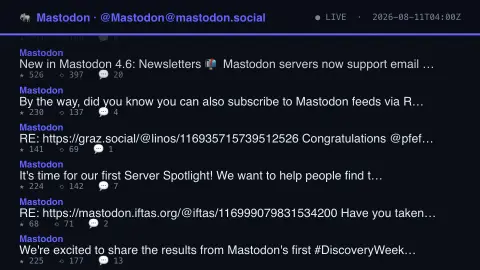
Press ESC to leave fullscreen. Settings are saved in your browser only.
How the Mastodon Single Account screensaver works
The background pipeline reads one account's public post history straight from its own Mastodon instance's key-less REST API.
Boosts and replies are filtered out, keeping only that account's own original posts.
Each new post eases up into its slot at the bottom of the list as it arrives.
No key is required for this key-less public endpoint.
Mastodon, the fediverse and public account data
Mastodon is free, open-source social networking software, and it is not a single site. Many independently operated servers, called instances, run it and interconnect through a shared protocol, ActivityPub, forming what is called the fediverse. An account lives on one instance, and the handle includes the server name, so the same username can exist separately on several servers.
Each instance exposes a REST API, and posts that are set to public can be read without logging in. The responses are structured: the post body as HTML, the creation time, counts of replies, boosts and favourites, plus attached media and any content warning. A boost is Mastodon’s term for a repost, which is why a feed of an account’s own posts needs boosts filtered out.
Some caveats apply. Only posts the account has made public are visible, and followers-only or direct posts do not appear. Posts can also be edited or deleted after publication, so what scrolls past could change or vanish at the source. What the display shows is one account’s public output, and it is no reflection of the network as a whole.
A worked example
A real recent post from the configured account scrolls into view with its real favourite, boost and reply counts, then eases upward as newer posts arrive.
Settings & tips
- The featured account and instance are set by the site's pipeline, not chosen in your browser.
- Accent recolours the header and highlights.
- Boosts and replies are skipped so the feed shows only the account's own original words.
Frequently asked questions
- Whose posts does this show?
- A single Mastodon account configured by the site owner's pipeline — real, recent, original posts only.
- Is a key needed?
- No. Any Mastodon instance's public REST API is fully key-less for reading public accounts.
- Does it show boosts or replies?
- No — boosts and replies are filtered out, so you only see the account's own original posts.
- Is it free?
- Yes — free, no download, in your browser.
- What is the fediverse?
- A network of independently run servers that exchange posts through open protocols such as ActivityPub, so users on different servers can follow each other.
- Can this show private or followers-only posts?
- No. Only content the account has published publicly is available without signing in, so restricted posts are never visible.
- What is a boost?
- Mastodon’s version of a repost, sharing someone else’s post with your followers. It is a different kind of activity from writing an original post.