Bluesky Single Account Screensaver
The Bluesky Single Account screensaver streams real recent posts from one Bluesky account as they're posted. It is free, runs in your browser, and ESC exits.
Live preview
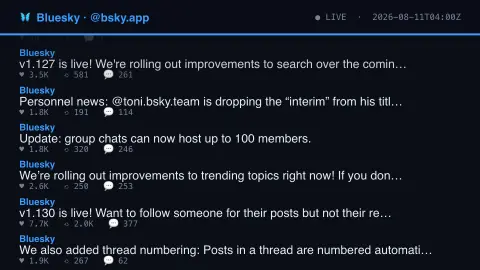
Press ESC to leave fullscreen. Settings are saved in your browser only.
How the Bluesky Single Account screensaver works
The background pipeline reads one account's public post history from the AT Protocol's own key-less appview API.
Reposts are filtered out, keeping only that account's own original posts.
Each new post eases up into its slot at the bottom of the list as it arrives.
No key is required for this key-less public endpoint.
The AT Protocol behind a Bluesky post
Bluesky is a social network built on the AT Protocol, an open standard. Each account has a DID, a stable identifier based on a W3C standard, and a handle, which is a human-readable DNS name such as alice.host.com. Applications resolve a handle to a DID and then treat the DID as the canonical account identifier, so the handle is the user-facing name while the DID is what stays put. The protocol's documentation says users should not lose their identity when they change hosting provider.
A post is a record with its text and a creation time, and the like, repost and reply counts shown beside it are tallied by the application that serves the data rather than stored in the post itself. The saver reads that account's posts through Bluesky's public appview API, which lets anyone read public posts without logging in. Post text is limited in length, so longer thoughts are often split into threads or posted with images or links attached.
The counts are a snapshot taken when the data were collected, and they can keep rising after a post goes out. Posts can also be deleted afterwards, so what you see reflects the account at fetch time. A single account is only one voice: its posts show what that person or organisation chose to say, and are not a view of the whole network.
A worked example
A real recent post from the configured account scrolls into view with its real like, repost and reply counts, then eases upward as newer posts arrive.
Settings & tips
- The featured account is set by the site's pipeline, not chosen in your browser.
- Accent recolours the header and highlights.
- Reposts are skipped so the feed shows only the account's own words.
Frequently asked questions
- Whose posts does this show?
- A single Bluesky account configured by the site owner's pipeline — real, recent, original posts only.
- Is a key needed?
- No. The AT Protocol's public appview API is fully key-less.
- Does it show reposts?
- No — reposts are filtered out, so you only see the account's own original posts.
- Is it free?
- Yes — free, no download, in your browser.
- What is a handle on Bluesky?
- A human-readable DNS name that identifies the account, such as alice.host.com. Applications resolve it to a DID, the stable identifier the protocol uses as the canonical account ID.
- Why might the like counts be out of date?
- They are captured when the data is gathered, and posts can keep accumulating reactions afterward.
- Can I follow the account from this display?
- The display is read-only. To follow or reply you need to use Bluesky itself or another AT Protocol client.