Map Problems Reported Screensaver
The Map Problems Reported screensaver shows open OpenStreetMap notes as people file them, key-less. It's free, runs in your browser, and ESC exits.
Live preview
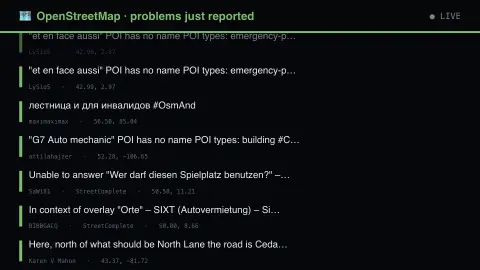
Press ESC to leave fullscreen. Settings are saved in your browser only.
How the Map Problems Reported screensaver works
The saver reads the source described above and draws it on a canvas — no account, no tracking.
Open OpenStreetMap notes as people file them, key-less. A note is what a mapper leaves when they can see something is wrong but cannot fix it: a road gone, a shop closed, a path blocked. Distinct from the site's edit stream, which shows fixes going in.
It refreshes on a schedule, so what you see stays current.
Colours and any options can be changed in settings; nothing is stored beyond your own browser.
What an OpenStreetMap note is
OpenStreetMap is a collaboratively edited map of the world. Not everyone who spots an error wants to edit the data directly, so it provides notes: a comment pinned to a place on the map that helps other contributors map or edit, such as a new road or a shop that has closed. Anonymous users can add notes, and logging in is not required.
A note stays open until someone resolves it, which requires logging in; this includes notes that are no longer valid, such as duplicates. Logged-in authors have notes linked to their username and receive email when someone comments or resolves them. Notes reported for abusive or illegal content can be hidden by the data working group.
This saver shows open notes as they are filed. The wiki warns that edits should not be made based only on a note: contributors should check context and other sources first, because some notes are misleading or false. Notes are written in whatever language the reporter uses, so expect a mix, and a quiet area on the display says little about its map.
A worked example
Open OpenStreetMap notes as people file them, key-less. A note is what a mapper leaves when they can see something is wrong but cannot fix it: a road gone, a shop closed, a path blocked. Distinct from the site's edit stream, which shows fixes going in.
Settings & tips
- Accent and Background recolour the display.
- Every value on screen comes from the live source — nothing is simulated.
- Press ESC to leave fullscreen.
Frequently asked questions
- Is this real data?
- Yes — it comes from the source named on this page and is refreshed on a schedule.
- Is a key needed?
- No. This source is fully key-less.
- Is it free?
- Yes — free, no download, in your browser.
- Do I need an account to leave a note?
- No. Anonymous users can add notes. Logging in links the note to your username and sends you email when someone comments or resolves it.
- Do notes get changed on the map automatically?
- No. A note is only a flag. OpenStreetMap’s guidance is that edits should not be made based only on a note, and that contributors should check the context and other sources first.
- Who can close a note?
- Resolving a note requires logging in. Notes that are no longer valid, including duplicates and invalid ones, can be resolved, and abusive notes can be hidden by the data working group.