London Tube Status Screensaver
The London Tube Status screensaver shows live line status for the London Underground, DLR, Overground and Elizabeth line, straight from Transport for London's key-less API, drawn in each line's own colour. It's free, runs in your browser, and ESC exits.
Live preview
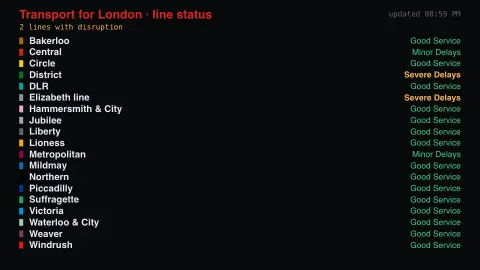
Press ESC to leave fullscreen. Settings are saved in your browser only.
How the London Tube Status screensaver works
The saver reads Transport for London directly in your browser — no key and no account.
Live line status for the London Underground, DLR, Overground and Elizabeth line, straight from Transport for London's key-less API, drawn in each line's own colour..
It refreshes on a schedule, so what you see stays current.
Colours can be changed in settings; nothing is stored beyond your own browser.
How TfL reports the state of the Tube
Transport for London publishes a live status for each of its rail lines through its open API. The Underground lines, the Docklands Light Railway and the Elizabeth line are covered, and the Overground now appears as separately named lines: Liberty, Lioness, Mildmay, Suffragette, Weaver and Windrush.
Each line carries a status label. The API’s list of status descriptions includes Good Service, Minor Delays, Severe Delays, Part Closure, Part Suspended, Planned Closure, Reduced Service and Suspended, among others, and a line can also include a written reason. These labels describe a line as a whole, so Minor Delays can cover a wide range of situations, and Planned Closure marks an expected closure, usually for engineering work, rather than a fault.
The board shows a snapshot of what TfL reports when the data is requested, so a disruption may appear a little after it starts. It describes lines, not individual journeys, so use TfL’s journey planner for a specific trip.
A worked example
Live line status for the London Underground, DLR, Overground and Elizabeth line, straight from Transport for London's key-less API, drawn in each line's own colour.
Settings & tips
- Accent and Background recolour the display.
- Data comes straight from Transport for London in your browser.
- Press ESC to leave fullscreen.
Frequently asked questions
- Is this real data?
- Yes — it comes from Transport for London and is refreshed on a schedule.
- Is a key needed?
- No. This source is fully key-less.
- Is it free?
- Yes — free, no download, in your browser.
- Which lines are included?
- The Underground lines, the DLR, the Elizabeth line and the Overground lines, which TfL now lists under their own names (Liberty, Lioness, Mildmay, Suffragette, Weaver and Windrush).
- What status labels can a line show?
- TfL’s status list includes Good Service, Minor Delays, Severe Delays, Part Closure, Part Suspended, Planned Closure, Reduced Service and Suspended, among others.
- Does the board plan journeys?
- No. It shows the state of each line, not routes or times, so use TfL’s journey planner for a specific trip.