Digitised In New Zealand Screensaver
The Digitised In New Zealand screensaver streams items as they arrive in DigitalNZ, the national aggregator that federates the collections of libraries, museums, broadcasters and archives across the country into one index. It runs in the browser with nothing to install; press ESC to exit.
Live preview
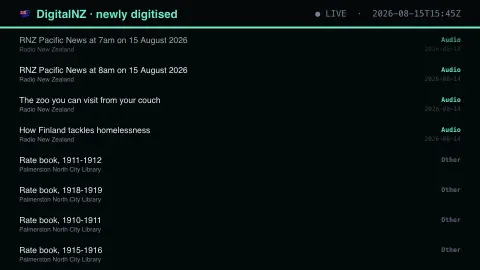
Press ESC to leave fullscreen. Settings are saved in your browser only.
How the Digitised In New Zealand screensaver works
The saver reads The DigitalNZ API, refreshed through this site's pipeline.
No account and no key: the request goes straight from your browser, or from this site's own refreshed copy of the feed where the source does not allow browser access.
Values are drawn on a canvas that resizes with the window, so it works on a laptop or a wall display.
If the source is unreachable the saver says so on screen rather than showing stale numbers as though they were current.
DigitalNZ and the aggregated collection
DigitalNZ was established in 2008 by the National Library of New Zealand. It brings together digital items from heritage, government, academic, media and community organisations into one searchable service, covering photos, audio, video, maps, newspapers, artworks and research papers. Its own About page cites more than 200 content partners.
What flows past in the feed is therefore a mix of very different things: a historical photograph, a recording, a newspaper page or a map. Each record is described by the organisation that contributes it, so the quality and detail of titles and descriptions vary from one source to the next.
Aggregation brings uneven coverage. Some partners contribute far more material than others, so the items shown are not a balanced picture of the country. Rights and usage conditions differ between items and are determined by the original contributor, so check the item’s own record before reusing anything.
A worked example
Each row gives an item's title, the institution that contributed it, and a colour-coded category — images, audio, video, newspapers, manuscripts. The mix is the point: a 1940s Air Force photograph and a radio segment broadcast this morning arrive in the same feed. The content partner column names which institution is actively putting its holdings online.
Settings & tips
- Accent and Background recolour the display without changing the data.
- Add it to a Multi-view grid to watch it alongside other live savers.
- Press ESC at any time to leave fullscreen.
Frequently asked questions
- What is DigitalNZ?
- A national aggregator run by the National Library of New Zealand. It does not hold the items itself; it indexes what museums, libraries, archives and broadcasters have digitised, so they can be searched in one place.
- Why do some titles look like reference codes?
- Because that is what the contributing institution catalogued them as. Archival photographs often carry an accession number rather than a descriptive title, and the aggregator passes through whatever the source recorded.
- Is this real data?
- Yes. It comes from The DigitalNZ API, refreshed through this site's pipeline. Nothing is invented or simulated, and if the source cannot be reached the saver reports that instead of drawing something plausible.
- Does it cost anything or need an account?
- No. Every screensaver here is free, runs in the browser and needs no sign-up. This one uses a public API that requires no key.
- Does DigitalNZ store the images and documents?
- DigitalNZ is an aggregator: it brings contributors’ items together into one service, and the contributing organisation remains the source of each item. Check an item’s record for where the full version lives.
- Can the items be reused freely?
- It depends on the item. Rights and usage conditions vary, so check the individual record and the contributor’s statement before reusing it.